IP Networking Mastery
Networking Fundamentals
The What and Why of Networks
A computer network is simply two or more computers linked together. The goal is to share things. This could be a file, an internet connection, or access to a printer.
Think of a network like a city's road system. Houses and offices are computers. The roads are the connections that let people (data) travel from one place to another. Without roads, every location would be isolated. With them, communication and commerce can flourish. Networks do the same for our digital devices.
Rules of the Road
For devices on a network to understand each other, they need to follow a set of rules, called protocols. These protocols are organized into layers, each with a specific job. This layered approach is called a model. It helps break a complex process, like sending an email, into smaller, manageable steps.
The most famous conceptual model is the Open Systems Interconnection (OSI) model. It has seven layers. Think of it like sending a package. You have steps for writing the letter, putting it in an addressed envelope, taking it to the post office, sorting, and final delivery. Each step is a different layer.
While the OSI model is great for theory, the internet actually runs on a more practical model: TCP/IP. It's a more streamlined version, condensing the seven OSI layers into four.
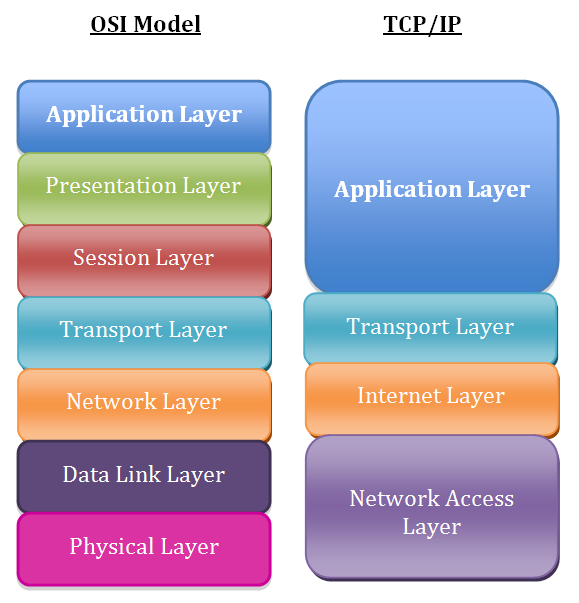
Essentially, the TCP/IP model's Application layer handles what the OSI model's top three layers do, and its Network Access layer combines the bottom two.
Network Traffic Control
To make a network function, you need specialized hardware to direct traffic. Three key devices are hubs, switches, and routers. While they might look similar, their roles are very different, and they operate at different layers of the OSI model.
A hub is the simplest of the three. It's a central connection point for devices in a network. When a hub receives data, it broadcasts it to every single device connected to it, whether that device is the intended recipient or not. It’s like a town crier shouting a message to the entire village, even if it’s only meant for one person. Hubs operate at the Physical Layer (Layer 1).
Because hubs create so much unnecessary traffic, they are considered inefficient and are rarely used in modern networks.
A switch is smarter. It connects devices on a single local network, just like a hub. However, when a switch receives data, it figures out which specific device the data is intended for and sends it only to that device. It's more like a modern postal worker delivering a letter to a specific mailbox instead of shouting its contents to the whole neighborhood. This makes the network much more efficient and secure. Switches operate at the Data Link Layer (Layer 2).
A router is the most intelligent of the three. While a switch creates a network, a router connects different networks together. Your home router, for instance, connects your local network (your laptop, phone, etc.) to the internet, which is a massive global network. Routers use logical addresses to determine the best path to send data across these interconnected networks. Think of a router as an airport traffic controller, directing planes (data packets) between different cities (networks) around the world. Routers operate at the Network Layer (Layer 3).
| Device | OSI Layer | Function | Analogy |
|---|---|---|---|
| Hub | 1 (Physical) | Connects devices, broadcasts data to all | Town crier |
| Switch | 2 (Data Link) | Connects devices, sends data to a specific one | Postal worker |
| Router | 3 (Network) | Connects different networks, finds best path | Airport traffic controller |
Understanding these core components—the purpose of networks, the models that govern them, and the devices that direct traffic—is the first step to understanding how our digital world is connected.