Introduction to Website Development
Introduction to HTML
The Skeleton of the Web
Every website you visit, from a simple blog to a massive online store, is built on a foundation of HTML. HTML stands for HyperText Markup Language, and it's the standard language for creating web pages. Think of it as the skeleton of a website. It provides the basic structure and organizes all the content, like text, images, and links.
HTML, or HyperText Markup Language, provides the skeleton for your web content.
Without HTML, a web browser wouldn't know how to display text as a heading or a paragraph, or how to show an image. It tells the browser what each piece of content is.
Anatomy of an HTML Page
An HTML document is a simple text file made up of elements. These elements are created using tags, which are keywords surrounded by angle brackets, like <p>. Most tags come in pairs: an opening tag and a closing tag. For example, <p> opens a paragraph, and </p> closes it. Everything between them is the content of that element.
A basic HTML page has a specific structure. It always starts with a document type declaration, <!DOCTYPE html>, which tells the browser it's an HTML5 document. The rest of the content is wrapped in <html> tags. Inside, you'll find a <head> section and a <body> section.
The <head> contains meta-information about the page, like the title that appears in the browser tab. This information isn't displayed on the page itself.
The <body> contains all the content that you actually see on the page, like headings, paragraphs, and images.
<!DOCTYPE html>
<html>
<head>
    <title>My Awesome Webpage</title>
</head>
<body>
    <h1>Welcome to My Site</h1>
    <p>This is the first paragraph.</p>
</body>
</html>
This basic structure forms the template for every single webpage.

Common Building Blocks
Once you have the basic structure, you fill the <body> with content using different tags.
Headings and Paragraphs
To structure your text, you'll use headings and paragraphs. HTML provides six levels of headings, from <h1> (the most important) to <h6> (the least important). Paragraphs are created with the <p> tag.

Lists
There are two main types of lists. Unordered lists, created with <ul>, are for items where the order doesn't matter, like a list of ingredients. Ordered lists, created with <ol>, are for items where the order is important, like step-by-step instructions. Each item in either list is marked with an <li> tag.
<ul>
  <li>Apples</li>
  <li>Oranges</li>
  <li>Bananas</li>
</ul>
Links
Links, or hyperlinks, allow you to connect one page to another. They are created with the anchor tag, <a>. The destination of the link is specified in the href attribute.
<a href="https://www.wikipedia.org">Go to Wikipedia</a>
Images
To display an image, you use the <img> tag. This is a self-closing tag, meaning it doesn't need a separate closing tag. It has two essential attributes: src (source), which is the path to the image file, and alt (alternative text), which describes the image. The alt text is crucial for accessibility, as it's read aloud by screen readers for visually impaired users and displayed if the image fails to load.
<img src="images/cat.jpg" alt="A fluffy orange cat sleeping on a rug">
Writing with Meaning
It's not enough to just use tags; it's important to use the right tags. This practice is called semantic HTML. It means using HTML elements for their intended purpose. For example, use a <h1> for the main title of a page, not just because you want big text. Use <p> for paragraphs, not for creating space between elements.
Semantic HTML describes the meaning of the content, not its appearance.
Why does this matter? First, it helps search engines like Google understand your content, which can improve your site's ranking (SEO). Second, it makes your website accessible to people using assistive technologies, like screen readers. A well-structured, semantic page is easier for everyone to navigate and understand.
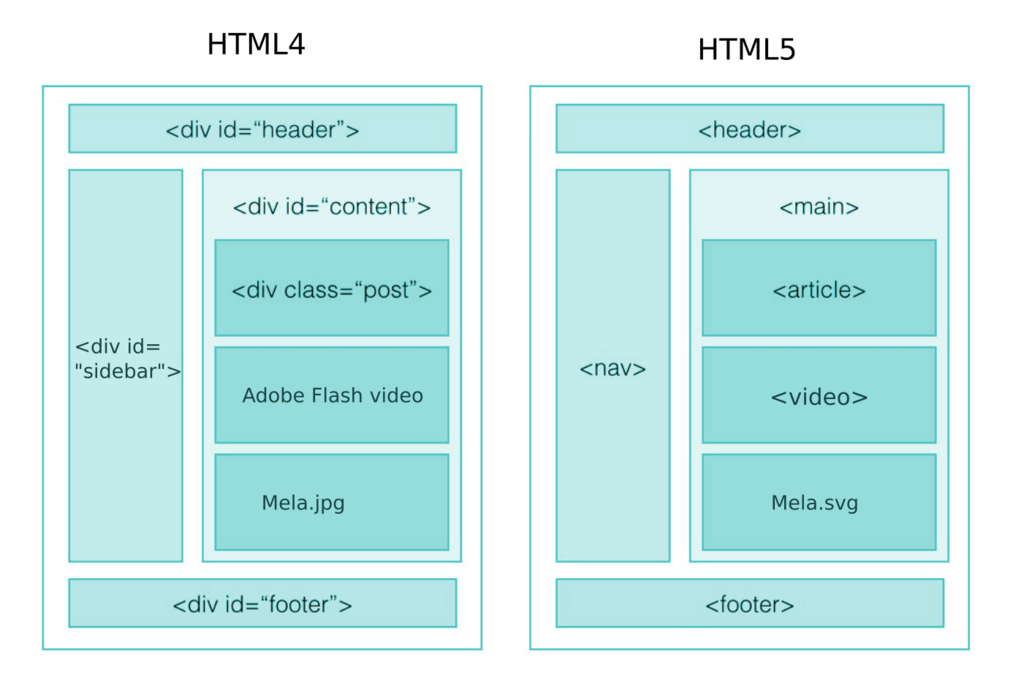
Modern HTML5 introduced tags that give even more meaning to the layout of a page, such as <header>, <footer>, <nav> (for navigation links), and <article>. Using these tags creates a more descriptive and robust structure.
Now that you understand the basic components, you're ready to start building your own web pages.
What does HTML stand for?
Which section of an HTML document contains all the content visible on the web page, like headings, paragraphs, and images?