Introduction to Software Development
Introduction to Software Development
What Is Software?
At its core, software is a set of instructions that tells a computer what to do. Think of it like a recipe. A recipe lists ingredients (data) and a series of steps (instructions) for a chef to follow to create a dish. Similarly, software provides data and instructions that a computer's processor follows to perform a task.
Software
noun
The programs and other operating information used by a computer.
This is different from hardware, which refers to the physical components of a computer system—the things you can actually touch, like the screen, keyboard, and internal chips. Hardware is the body; software is the mind. Without software, a smartphone is just a sleek piece of glass and metal. It's the software that lets you make calls, browse the internet, and take photos.
The Three Main Kinds
Software isn't a single, monolithic thing. It comes in different flavors, each serving a unique purpose. We can group most software into three main categories.
1. System Software This is the foundational software that manages computer hardware and provides a platform for other software to run. The most important piece of system software is the operating system (OS), like Windows, macOS, Android, or iOS. It handles essential tasks like managing memory, processing inputs from your mouse and keyboard, and controlling peripherals like printers. It's the silent, hardworking manager of the entire system.
2. Application Software This is the software you interact with directly to perform specific tasks. It's often called an "app." Web browsers, word processors, video games, photo editors, and social media apps are all examples. Application software relies on the system software to function; it can't run without the OS.
3. Development Tools This is the software that developers use to create other software. These tools include text editors for writing code, compilers that translate human-readable code into machine-readable instructions, and Integrated Development Environments (IDEs) that bundle many of these tools together. They are the hammers, saws, and wrenches of the digital world.
The Software Blueprint
Great software doesn't just appear out of nowhere. It's the result of a structured, methodical process called the Software Development Life Cycle, or SDLC. This process provides a roadmap for turning an idea into a functional application, helping teams build high-quality software efficiently.
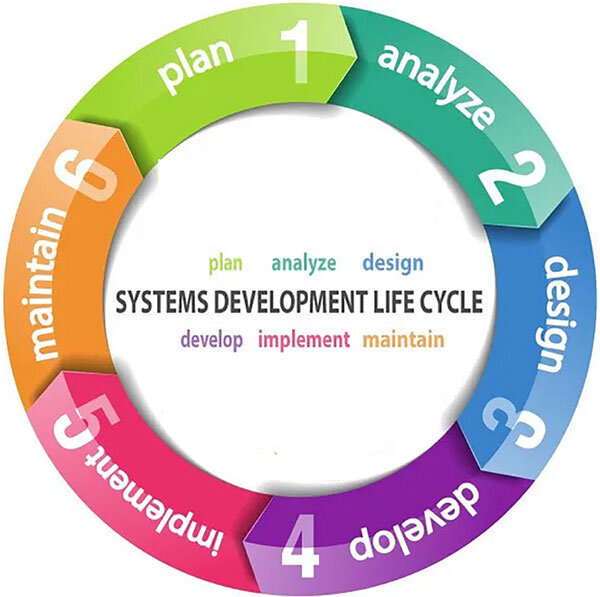
While there are many variations, the process generally involves these key stages:
- Planning: The team defines the project's goals. What problem will the software solve? Who is it for? What features are needed?
- Design: Architects and designers create a blueprint. This includes designing the user interface (what it looks like), the user experience (how it feels to use), and the underlying system architecture (how it works behind the scenes).
- Development: This is the coding phase. Developers write the source code based on the design specifications.
- Testing: Quality assurance (QA) testers rigorously check the software for bugs and defects. They ensure it works as expected and meets the requirements laid out in the planning phase.
- Deployment: The software is released to users. This might involve publishing an app to an app store, installing it on company computers, or launching a website.
- Maintenance: After release, the work isn't over. The team fixes bugs that are discovered, releases updates with new features, and ensures the software continues to run smoothly.
Software is an integral part of modern life, from the global financial system to the phone in your pocket. Understanding what it is and the disciplined process required to create it is the first step into the world of technology.
Which of the following analogies best describes the relationship between hardware and software?
An operating system like macOS or Windows is considered the most important type of ________ software.