Introduction to Python Programming
Python Basics
Getting Started with Python
Before you can write any Python code, you need a place to write and run it. This is your development environment. Many computers, especially Macs and Linux machines, come with Python already installed. You can check by opening a terminal or command prompt and typing python --version.
If you don't have it, or have an older version, the best place to get the latest version is the official Python website, python.org. The installation is straightforward. Just download the installer for your operating system and follow the steps.
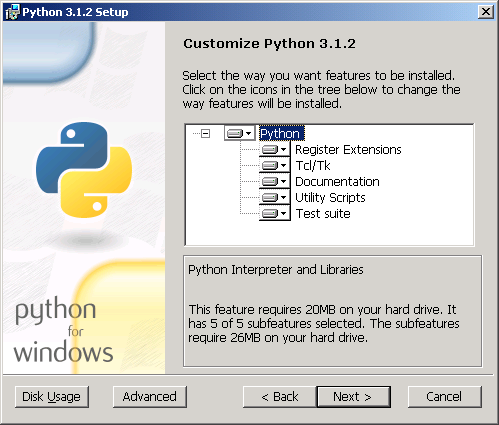
Once installed, you have a few ways to write code. You can use Python's built-in IDLE, a simple editor that comes with the installation. For bigger projects, many developers use more powerful tools called Integrated Development Environments (IDEs) like VS Code or PyCharm.
For a quick start without installing anything, you can also use an online Python editor right in your web browser. These are great for experimenting with small scripts.
Variables and Data
Think of variables as labeled boxes where you can store information. You put data into a box and give it a name so you can find it later. In Python, you create a variable by giving it a name and using the equals sign (=) to assign it a value.
# The variable 'age' now holds the number 28
age = 28

# The variable 'name' now holds the text 'Alex'
name = "Alex"
The kind of information you store determines its data type. Python is smart and usually figures out the type on its own. The most common basic types are:
| Data Type | Description | Example |
|---|---|---|
| Integer | Whole numbers, positive or negative. | 42, -100 |
| Float | Numbers with a decimal point. | 3.14, -0.001 |
| String | Text, wrapped in single or double quotes. | 'hello', "Python" |
| Boolean | Represents truth values. Can only be True or False. | True, False |
You can reassign a variable to hold a different value, or even a different type of data, at any time.
current_year = 2024
print(current_year)

# Reassigning the variable
current_year = 2025
print(current_year)
Interacting with Your Program
What good is a program if you can't see what it's doing or give it new information? Python has simple, built-in ways to handle basic input and output.
To display information on the screen, you use the print() function. You just put whatever you want to show inside the parentheses.
# Print a string directly
print("Hello, world!")

# Print the value of a variable
user_greeting = "Welcome to Python!"
print(user_greeting)
You can also combine different pieces of data in a single print() statement using a comma. It will automatically add a space between the items.
planet = "Mars"
year = 2035
print("Destination:", planet, "ETA:", year)
To get information from a user, you use the input() function. This function displays a prompt to the user and waits for them to type something and press Enter. Whatever the user types is then returned as a string, which you can store in a variable.
# Ask the user for their name and store it
user_name = input("Please enter your name: ")

# Greet the user by name
print("Hello,", user_name)
A quick note: The
input()function always gives you back a string. If you ask for a number and want to do math with it, you'll need to convert it to an integer or float first. We'll cover that later!
Let's test what you've learned about Python's basic building blocks.
How can you check if Python is installed and see its version from the command line or terminal?
What is the primary function of a variable in Python?
With these fundamentals—setting up your environment, storing data in variables, and handling simple input and output—you have the core tools to start writing your own Python scripts.