Introduction to Python Programming
Python Basics
What is Python?
Python is a popular programming language known for its clear and readable code. Created by Guido van Rossum and first released in 1991, its design philosophy emphasizes simplicity. This makes it a great language for beginners and a powerful tool for professionals.
It's a versatile language used for many things, from building websites and automating tasks to analyzing data and creating machine learning models. Companies like Google, Netflix, and Instagram use Python extensively.

Setting Up Your Environment
To run Python code, your computer needs a Python interpreter, which reads and executes your scripts. Many operating systems, like macOS and Linux, come with Python pre-installed. You can check if you have it by opening a terminal (or Command Prompt on Windows) and typing the following command:
python --version
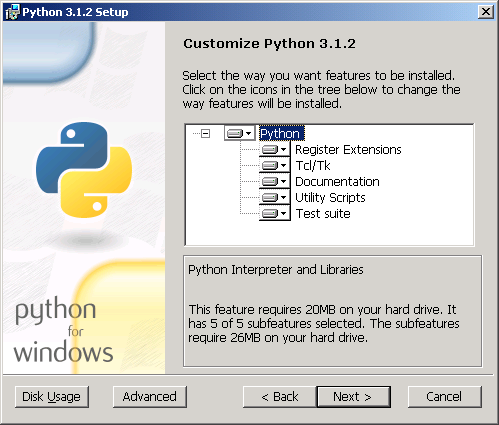
If Python is installed, this will show you the version number. If not, or if you want the latest version, you can download it for free from the official Python website, python.org. The installer will guide you through the setup process.
Your First Python Script
Let's write a program. It’s a tradition for a first program in any new language to simply display the text "Hello, World!". In Python, this is incredibly simple. We use the built-in print() function.
# This line of code will print the text inside the parentheses.
print("Hello, World!")
To run this, open a plain text editor, type the code, and save the file as hello.py. The .py extension is important. Then, navigate to the folder where you saved the file in your terminal and run it with this command:
python hello.py
You should see "Hello, World!" printed to the screen. You've just written and executed your first Python program.
Indentation and Comments
Python has a few rules that are important to know from the start. Two of the most important are indentation and comments.
Indentation refers to the spaces at the beginning of a code line. In other languages, indentation is just for readability. In Python, it's mandatory and has meaning. It's how Python knows which lines of code belong together in a block.
For example, the code inside an if statement must be indented. A common convention is to use four spaces for each level of indentation. Most code editors will do this automatically.
temperature = 30

if temperature > 25:
    # This line is indented, so it's part of the if block.
    print("It's a warm day!")
Comments are notes in your code that are ignored by the Python interpreter. They're for you or other programmers to understand what your code does. In Python, a comment starts with a hash symbol (#).
# This is a comment. It won't be executed.

# Assign the value 10 to the variable 'apples'
apples = 10

# Print the number of apples
print(apples) # You can also put comments at the end of a line.
Using comments and proper indentation makes your code clean, readable, and easier to debug.
Who is the creator of the Python programming language?
What is the primary purpose of indentation in Python?
Now that you've covered the absolute basics, you're ready to start exploring variables, data types, and more complex operations in Python.