Introduction to Python Programming
Introduction to Python
What is Python?
Python is a programming language created in the late 1980s by Guido van Rossum. He wanted to make a language that was easy to read and write. The name doesn't come from a snake, but from the British comedy group Monty Python's Flying Circus.
Its design philosophy emphasizes code readability with its notable use of significant indentation. This means the structure of the code is clean and uncluttered, making it one of the easiest languages for beginners to pick up.
Simple is better than complex. This is a core idea in Python's philosophy, known as The Zen of Python.
Beyond its simplicity, Python is incredibly powerful. It's a high-level, interpreted language. 'High-level' means it handles a lot of complexity for you, so you can focus on what you want to build. 'Interpreted' means you can run the code line by line without needing a separate compilation step, which makes testing and debugging much faster.
It also has a massive standard library, which is a collection of pre-written code you can use for common tasks. Need to work with dates, connect to the internet, or read a file? There’s likely a module for that already built-in. This is all supported by a huge, active community of developers who create and share even more tools.
What's It Used For?
Python's versatility is one of its greatest strengths. It’s not just for one specific type of job; it’s a general-purpose language used across many different industries.

Here are a few of the most popular areas where Python shines:
- Data Science & Machine Learning: Python is the go-to language for analyzing data, creating visualizations, and building artificial intelligence models. Libraries like pandas, NumPy, and TensorFlow make complex tasks much more manageable.
- Web Development: You can build robust websites and web applications with Python. Frameworks like Django and Flask provide the tools to create everything from simple blogs to complex e-commerce platforms.
- Automation & Scripting: If you have a repetitive task on your computer, you can probably write a simple Python script to do it for you. This can be anything from renaming files to scraping information from websites.
Getting Started
To start writing Python, you need a Python interpreter. This is the program that reads your Python code and carries out its instructions. The easiest way to get it is by downloading it directly from the official website, python.org.
The installation process is straightforward on Windows, macOS, and Linux. The installer will guide you through the steps and set everything up for you. During installation, make sure to check the box that says "Add Python to PATH." This lets you run Python from your computer's command line or terminal easily.

Alternatively, you can use an online Python interpreter. Websites like Replit or Google Colab let you write and run Python code directly in your web browser, with no installation required. This can be a great way to start experimenting right away.
Your First Program
A long-standing tradition in programming is to make your first program display the text "Hello, World!". In Python, this is remarkably simple. It takes just one line of code.
print("Hello, World!")
That’s it. The print() part is a function, which is a reusable block of code that performs a specific action. In this case, its action is to display whatever you put inside the parentheses.
To run this code, you can open a text editor, type that line, and save the file with a .py extension (for example, hello.py). Then, you can run it from your terminal by typing python hello.py. Or, even easier, you can open the Python interpreter directly in your terminal and type the line of code right there.
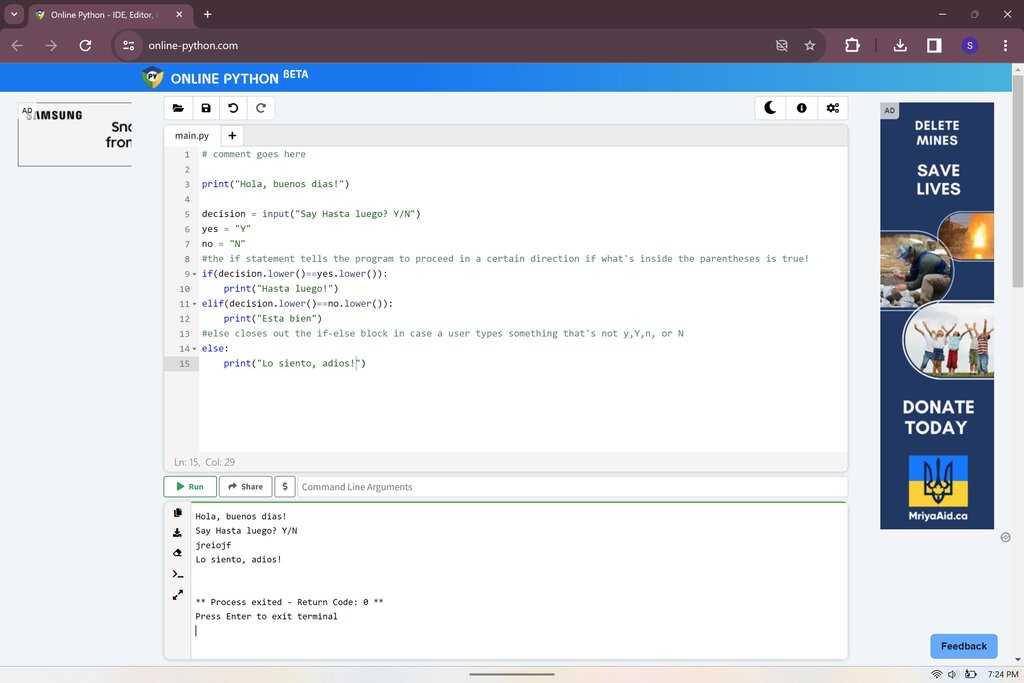
Congratulations, you’ve just written and run your first Python program. Now let's review what we've covered.
What was the inspiration for the name of the Python programming language?
Python's design philosophy emphasizes code readability through its notable use of _______.
You now have a solid foundation for what Python is, why it's so popular, and how to get started. The next step is to explore the basic building blocks of the language.