Introduction to Python Programming
Introduction to Python
What is Python?
Python is a high-level, interpreted programming language known for its simple, readable syntax. Created by Guido van Rossum and first released in 1991, its design philosophy emphasizes code clarity. The name comes from "Monty Python's Flying Circus," a British comedy series, reflecting a playful and accessible approach to programming.
Unlike compiled languages that must be fully translated to machine code before they can run, Python code is executed line by line by an interpreter. This makes it faster to test and debug programs.
Python's key features make it a powerful tool for beginners and experts alike:
- Easy to Learn: Its syntax is clean and intuitive, resembling plain English.
- Versatile: It's a general-purpose language used for everything from web development to data science.
- Large Community: A massive global community contributes to a rich ecosystem of libraries and frameworks, meaning you can find pre-written code for almost any task.
What is Python Used For?
Python's versatility has made it a popular choice across many industries and fields. It's not just for one specific type of task; it's more like a Swiss Army knife for programmers.

Some of its most common applications include:
- Web Development: Frameworks like Django and Flask allow developers to build robust and scalable websites and web applications quickly.
- Data Science & Machine Learning: Libraries such as pandas, NumPy, and TensorFlow have made Python the leading language for analyzing data, building machine learning models, and conducting scientific research.
- Automation: Python is excellent for writing scripts to automate repetitive tasks, like sending emails, organizing files, or scraping data from websites. This is often called scripting.
- Software Development: It's used to build desktop applications, games, and developer tools.
Getting Started
To start writing Python, you first need to install it. The official Python website, python.org, is the best place to download the latest version for your operating system. The installation process is straightforward on Windows, macOS, and Linux.
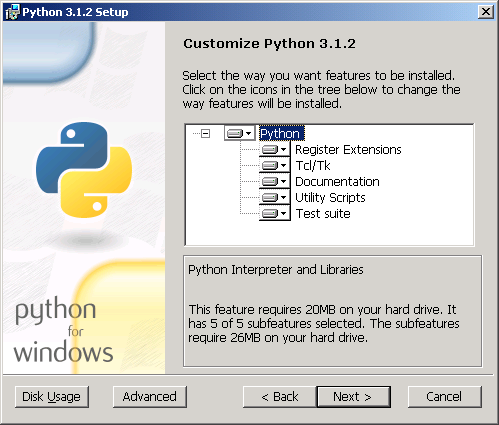
During installation on Windows, it's a good idea to check the box that says "Add Python to PATH." This allows you to run Python from your computer's command line or terminal without navigating to a specific folder.
Your First Program
The traditional first program for any new language is one that prints "Hello, World!" to the screen. It's a simple way to confirm that your installation is working and to get a feel for the language's syntax.
In Python, this is incredibly simple. It takes just one line of code.
print("Hello, World!")
To run this, open your computer's terminal (Command Prompt on Windows, Terminal on macOS/Linux). Type python and press Enter to start the Python interpreter. Then, type the code above and press Enter again. You should see the message "Hello, World!" printed back to you.
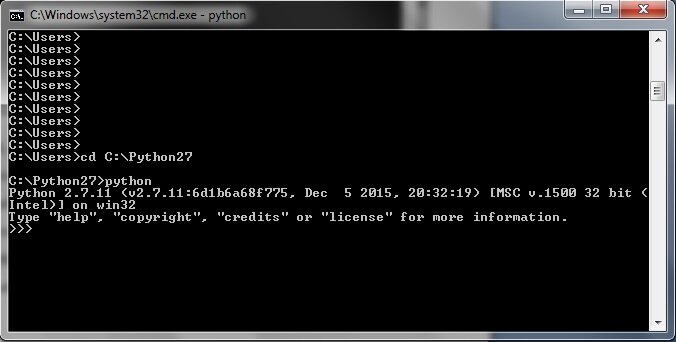
This interactive environment is called a REPL (Read-Eval-Print Loop). It's a great tool for quickly testing small snippets of Python code.
Time to check what you've learned.
What was the primary inspiration for the name of the Python programming language?
Python's design philosophy emphasizes code readability and simplicity above all else.
Congratulations on writing your first program! You've taken the first step into the world of Python.