Introduction to Java Programming
Java Basics
Setting Up Your Workshop
Before you can start building with Java, you need to set up your digital workshop. This involves two key components: the Java Development Kit (JDK) and an Integrated Development Environment (IDE).
Think of the JDK as your toolbox. It contains all the essential tools you need to write and prepare your Java code, including the compiler, which translates your human-readable code into something the computer can understand.
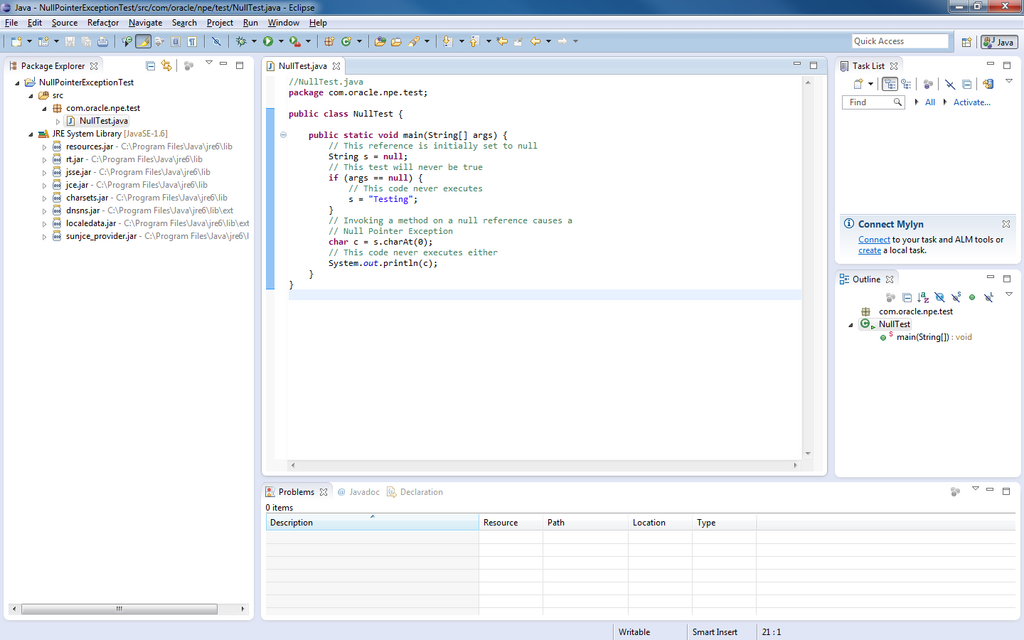
An IDE is the workbench itself. It's a software application that provides a programmer-friendly environment to write code. It typically includes a text editor, tools for automating tasks, and a debugger for finding mistakes. Popular choices for Java include Eclipse, IntelliJ IDEA, and VS Code. An IDE simplifies the process, so you can focus on writing code instead of wrestling with command-line tools.
Your First Program
It's a tradition for programmers to start with a simple program that just displays "Hello, World!" on the screen. Let's look at how to do this in Java.
public class HelloWorld {
    // This is the main entry point for the program.
    public static void main(String[] args) {
        // This line prints the text to the console.
        System.out.println("Hello, World!");
    }
}
When you run this code, your IDE first uses the JDK's compiler (javac) to turn your source code (the .java file) into a format called bytecode (a .class file). This bytecode isn't tied to any specific operating system like Windows or macOS.
Instead, a program called the Java Virtual Machine (JVM) reads and executes the bytecode. Since a JVM is available for almost every type of device, you can run the same compiled bytecode anywhere. This is Java's famous "write once, run anywhere" philosophy.
Java source code → Compiler → Bytecode → Java Virtual Machine (JVM) → Program runs!
Building Blocks of Data
Programs work by manipulating data. In Java, every piece of data has a type that tells the computer what kind of information it is and what you can do with it. Java has several fundamental, or primitive, data types for storing simple values.
| Data Type | Description | Example |
|---|---|---|
int | Integers, or whole numbers. | int age = 30; |
double | Numbers with decimal points. | double price = 19.99; |
boolean | A true or false value. | boolean isLoggedIn = true; |
char | A single character. | char grade = 'A'; |
You can perform operations on these data types using operators. These are symbols that perform specific calculations or comparisons.
int a = 10;
int b = 5;

// Arithmetic Operators
int sum = a + b;        // 15
int difference = a - b; // 5
int product = a * b;    // 50
int quotient = a / b;   // 2

// Relational Operators
boolean isGreater = a > b; // true
boolean isEqual = (a == b); // false
Controlling the Flow
A program doesn't just run from top to bottom. It needs to make decisions and repeat actions. Control structures let you dictate the flow of your program's execution.
The if statement is the most basic decision-making tool. It executes a block of code only if a certain condition is true.
int score = 85;

if (score > 60) {
    System.out.println("You passed!");
} else {
    System.out.println("You need to study more.");
}
When you need to repeat a block of code multiple times, you use a loop. The for loop is great when you know exactly how many times you want to repeat an action.
// This loop will print numbers from 1 to 5.
for (int i = 1; i <= 5; i++) {
    System.out.println(i);
}
The while loop is used when you want to repeat an action as long as a condition remains true.
int countdown = 3;

while (countdown > 0) {
    System.out.println(countdown);
    countdown = countdown - 1; // Decrement the counter
}

System.out.println("Liftoff!");
Finally, the switch statement is useful when you have one variable that could be one of several distinct values. It's often cleaner than a long chain of if-else statements.
int day = 4;
String dayName;

switch (day) {
    case 1: dayName = "Monday"; break;
    case 2: dayName = "Tuesday"; break;
    case 3: dayName = "Wednesday"; break;
    case 4: dayName = "Thursday"; break;
    case 5: dayName = "Friday"; break;
    default: dayName = "Weekend"; break;
}

System.out.println(dayName); // Prints "Thursday"
Now, let's test your understanding of these core concepts.
What is the primary role of the Java Development Kit (JDK)?
The Java compiler (javac) transforms a .java source file into what?
These are the fundamental building blocks of Java. With a solid grasp of variables, data types, and control structures, you're ready to start building more complex and interesting programs.