Intermediate Computer Systems and Productivity
System Architecture Basics
The Conductor of the Orchestra
Your computer's hardware, like the CPU, memory (RAM), and storage drives, are like musicians in an orchestra. They are all incredibly powerful, but without a conductor, they would just create noise. The operating system (OS) is that conductor. It coordinates all the hardware, ensuring that every component works together harmoniously to run your applications.
At the very heart of the OS is the , the core program that has complete control over everything in the system. Think of it as the conductor's podium and score. It's the first major piece of software to load when you start your computer, and it remains in memory for as long as the computer is on. Every interaction between hardware and software must go through the kernel.

The kernel's primary job is resource management. When you run multiple applications at once, like a web browser, a music player, and a word processor, it's the kernel that juggles the CPU's attention between them. This process, known as multitasking, happens so fast that it seems like everything is running simultaneously. The kernel allocates slices of CPU time to each program, switching between them thousands of times per second.
Similarly, the kernel manages the computer's memory. It decides which application gets which part of the RAM, ensuring that one program doesn't interfere with another's data. If you run out of physical RAM, the kernel can use a part of your storage drive as temporary memory, a process called swapping.
Waking Up the Machine
When you press the power button, your computer doesn't instantly load your desktop. It goes through a startup procedure called the boot sequence.
First, a small program stored on a chip on the motherboard runs. This is the (Basic Input/Output System or Unified Extensible Firmware Interface). Its job is to perform a Power-On Self-Test (POST) to check that all the essential hardware, like RAM and storage, is working correctly. Once the checks pass, the BIOS/UEFI finds the bootloader, a small program on your main storage drive.
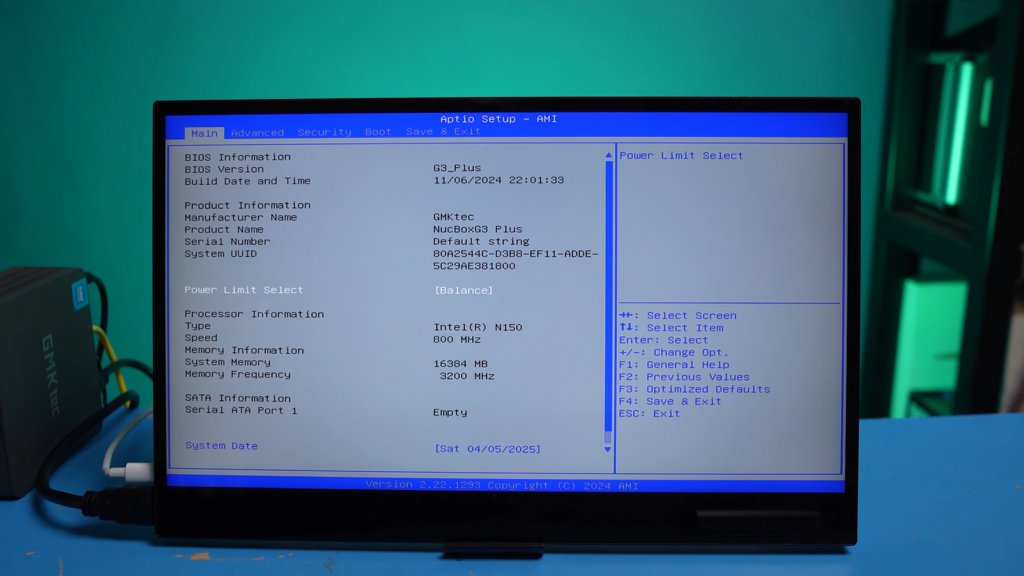
The bootloader's sole purpose is to load the kernel into memory and start it. Once the kernel is running, it takes over, initialising the rest of the OS. A key part of this process is loading drivers. A driver is a specific piece of software that acts as a translator between the OS and a piece of hardware. Your OS doesn't inherently know how to speak to every possible graphics card or printer. Instead, it uses the specific driver for that device to send and receive commands.
Layers of Abstraction
Operating systems are built in layers. This concept, known as , simplifies how software is created and run. At the very bottom is the physical hardware. Directly on top of that sits the kernel and its drivers. This layer is often called the Hardware Abstraction Layer (HAL), as it hides the complex specifics of the hardware from the software above it.
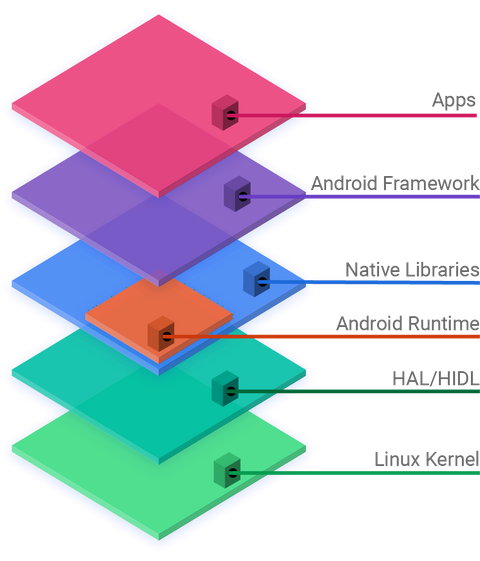
Above the kernel are system libraries and services, which provide common functions that applications can use. For example, instead of every application developer writing their own code to create a window or a button, they can simply ask the OS to do it for them via an API (Application Programming Interface).
Finally, at the very top, are the user applications you interact with every day. Thanks to the layers below, a program like a web browser can run on thousands of different hardware combinations without needing to be rewritten for each one. It simply talks to the OS, and the OS handles the rest.
Now, let's test your understanding of how these system components work together.
According to the orchestra analogy, what is the role of the operating system (OS) in a computer?
What is the central, core program of an operating system that has complete control over everything in the system?