HTTP Methods Explained for Developers
HTTP Request-Response Cycle
The Web’s Conversation
Every time you visit a website, your browser and a web server have a quick conversation. This back-and-forth is the foundation of how the internet works. Think of it like ordering at a cafe. You (the client) ask for something, like a coffee, and the barista (the server) gives it to you. On the web, your browser is the client, and the computer hosting the website is the server.
This whole process happens through a set of rules called the Hypertext Transfer Protocol, or HTTP. It’s the language clients and servers use to understand each other. The client sends an HTTP request, and the server sends back an HTTP response.

Anatomy of a Request
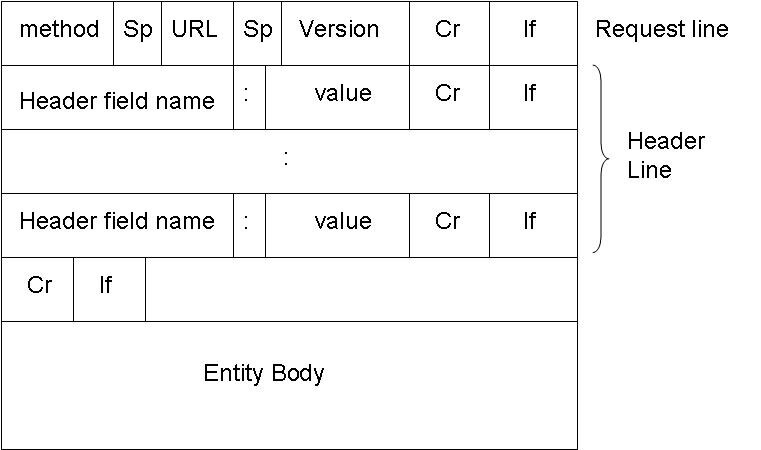
An HTTP request is just a structured text message. It has three main parts: the request line, headers, and an optional body. Let's look at a simple request to get the main page of a website.
GET /index.html HTTP/1.1
Host: www.example.com
User-Agent: Mozilla/5.0
Accept: text/html
The very first line is the request line. It tells the server what you want to do. It includes the HTTP method (like GET for retrieving data), the path to the resource (/index.html), and the protocol version (HTTP/1.1).
Following the request line are the headers. These provide extra information, like metadata, about the request. Each header is a key-value pair.
| Header | Purpose |
|---|---|
Host | The domain name of the server. |
User-Agent | Information about the browser making the request. |
Accept | The types of content the browser can understand. |
Finally, there's the body. For a GET request, the body is empty because you're just asking for data. But if you were submitting a form, the information you typed in would be sent in the body.
The Server's Reply
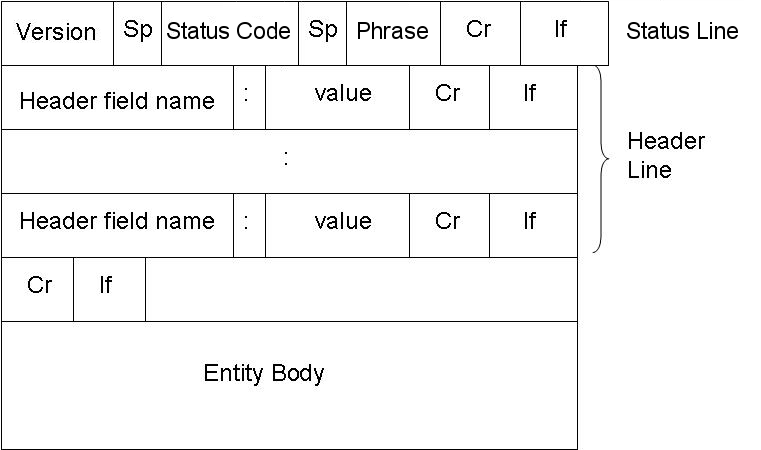
After the server receives and processes the request, it sends back an HTTP response. Like the request, the response is also a structured text message with a status line, headers, and a body.
HTTP/1.1 200 OK
Content-Type: text/html; charset=UTF-8
Content-Length: 1270

<!DOCTYPE html>
<html>
<head>...</head>
<body>...</body>
</html>
The first line is the status line. It includes the HTTP version, a status code, and a short status message. The status code is a three-digit number that tells the client the result of its request.
A
200 OKstatus is the standard response for a successful request. It means everything worked as expected.
Next are the response headers, which provide information about the response itself. Content-Type tells the browser what kind of data is being sent (like HTML, an image, or a PDF), and Content-Length gives its size in bytes.
The body of the response contains the resource that was requested. If you asked for a web page, the body will contain the HTML code for that page, which your browser then renders for you to see.
Understanding Status Codes
Status codes are a quick way for the server to communicate the outcome of a request. They are grouped into five classes, identified by their first digit:
- 1xx: Informational - The request was received, continuing process.
- 2xx: Success - The action was successfully received, understood, and accepted.
- 3xx: Redirection - Further action must be taken to complete the request.
- 4xx: Client Error - The request contains bad syntax or cannot be fulfilled.
- 5xx: Server Error - The server failed to fulfill an apparently valid request.
You don't need to memorize all of them, but a few are very common.
| Code | Meaning | Example |
|---|---|---|
200 OK | Success! The request was fulfilled. | You requested a page, and the server sent it. |
301 Moved Permanently | The requested resource has moved. | A website changed its address, and you're being redirected. |
404 Not Found | The server can't find the requested resource. | You clicked on a broken link. |
500 Internal Server Error | Something went wrong on the server's end. | A problem with the website's code or database. |
Now you know how your browser talks to the internet. Time to test your knowledge.
What is the primary protocol used for communication between a web browser (client) and a web server?
A user submits a login form. In which part of the HTTP request is the user's information, like their username and password, typically sent?
This request-response cycle is happening constantly as you browse, forming the simple yet powerful foundation of the web.