HTML Fundamentals
Introduction to HTML
The Skeleton of the Web
Every website you visit, from your favorite news site to a simple blog, is built on a foundation of HTML. Think of HTML as the skeleton of a webpage. It provides the fundamental structure, telling the browser how to organize all the text, images, and links you see on the screen.
HTML
noun
Stands for HyperText Markup Language. It's the standard language used to create and structure documents on the World Wide Web.
HTML uses a system of 'markup' to annotate text. This isn't a programming language that performs complex logic. Instead, it's a way to describe the content. Is this text a heading? Is that a paragraph? Is this a link to another page? HTML answers these questions for the browser.
One of HTML's main jobs is to give text structure so that a browser can display an HTML document the way its developer intends.
Elements and Tags
HTML works by using elements to enclose, or wrap, different parts of the content to make it appear or act a certain way. These elements are created using tags.
A tag is simply a keyword wrapped in angle brackets, like <p>. Most elements have an opening tag and a closing tag. The closing tag is the same as the opening one, but with a forward slash before the keyword, like </p>.
<p>This is a paragraph.</p>
In this example, the <p> element defines a paragraph. The opening tag <p> marks the beginning, and the closing tag </p> marks the end. Everything in between is the content of the paragraph.

You can also nest elements inside other elements. For example, you might want to emphasize a word within a paragraph by making it bold.
<p>This paragraph contains <strong>important</strong> text.</p>
Here, the <strong> element is nested inside the <p> element. The browser knows to display the word "important" with extra emphasis, usually as bold text, while keeping it as part of the overall paragraph.
Anatomy of an HTML Document
Individual elements are useful, but they need to be arranged in a specific way to form a complete HTML document. Every HTML page has a standard structure that acts as a blueprint.
<!DOCTYPE html>
<html>
  <head>
    <title>Page Title</title>
  </head>
  <body>
    <h1>This is a Heading</h1>
    <p>This is a paragraph.</p>
  </body>
</html>
Let's break that down:
<!DOCTYPE html>: This is a required declaration that tells the browser the document is an HTML5 page. It's always the very first line.<html></html>: This is the root element. All other elements on the page are nested inside it.<head></head>: This container holds information about the page, not the content displayed on it. This includes things like the page title, links to style sheets, and other metadata.<title></title>: This sets the title of the page, which appears in the browser tab.<body></body>: This is where all the visible content goes—headings, paragraphs, images, links, and everything else the user sees.
Semantic Elements
Early on, web developers often used generic elements like <div> to group content. While this works, it doesn't describe what the content is. Modern HTML encourages the use of semantic elements—tags that clearly describe their meaning to both the browser and the developer.
Semantic HTML means using tags that convey the meaning and structure of the content, not just its appearance.
Instead of using <div> for everything, you can use tags that define specific parts of a webpage.
| Semantic Element | Purpose |
|---|---|
<header> | Introductory content or navigational links |
<nav> | A set of navigation links |
<main> | The main, unique content of the page |
<article> | A self-contained piece of content |
<footer> | Footer for a section or page |
Using semantic elements makes your code easier to read and maintain. It also improves accessibility, as screen readers can better understand and navigate the page structure, and helps search engines like Google better index your content.
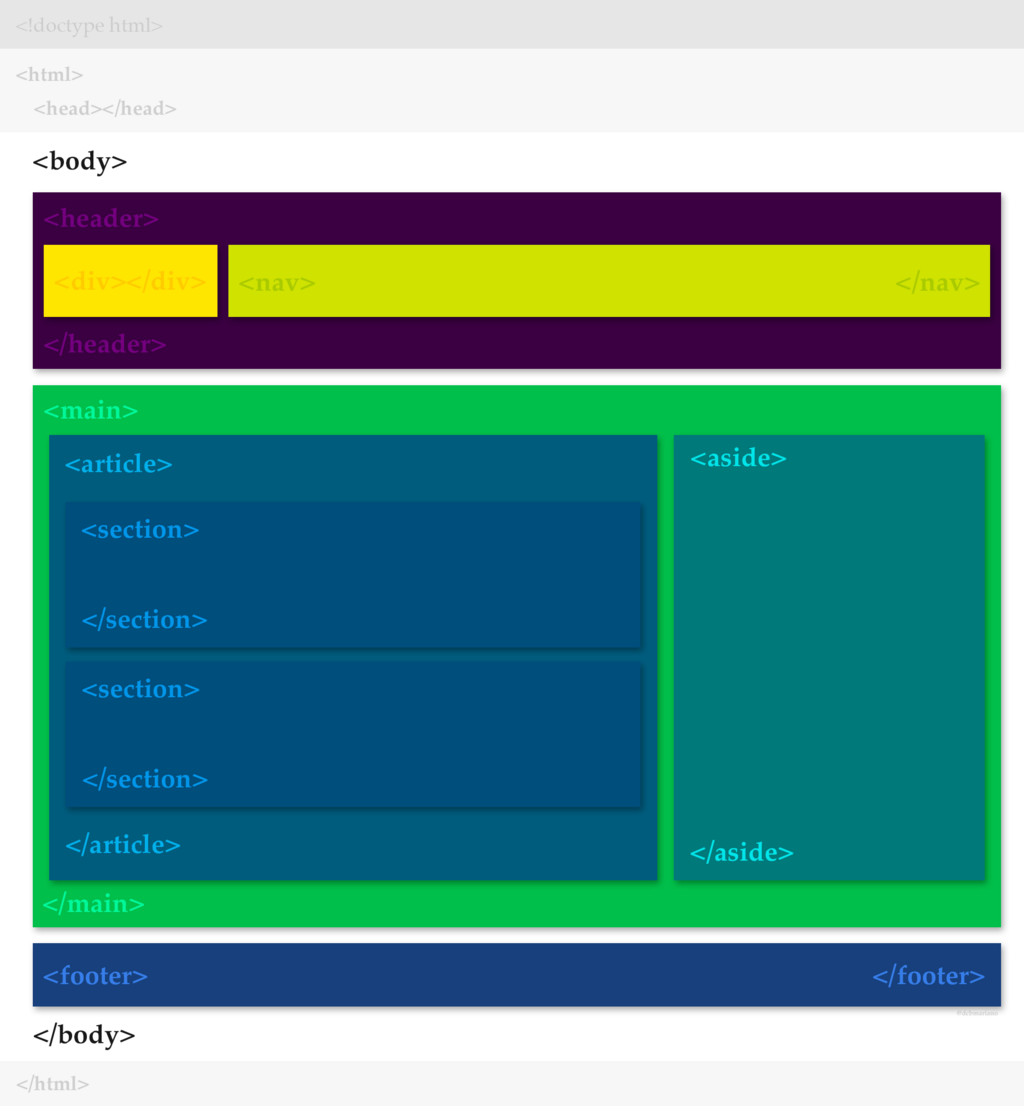
By using these foundational concepts, you can structure any web document, creating a clear and meaningful framework for your content. This structure is the first and most crucial step in building for the web.
Ready to check your understanding? Let's see what you've learned about the building blocks of the web.
What is the primary role of HTML in web development?
An HTML element is typically made up of an opening tag, content, and a ______.
You've now covered the absolute basics of what HTML is and how it works. With this foundation, you're ready to start exploring more elements and building your own structured web pages.