No history yet

How do touchscreens work?

Touchscreens are incredible pieces of everyday magic, and I would love to break down how they work for you! To make sure I tailor this explanation perfectly to your style, let's start with a quick question about what you're hoping to get out of our session.

Are you more interested in a high-level conceptual overview of how they work, or would you like to dive straight into the finer technical details, like the electrical components involved?

I want to dive into the technical details

Since you want to dive straight into the technical details, let's look at what actually makes a touchscreen unique: it is an integrated all in one.
Your path
How Resistive Touchscreens Work
Summary and Practical Applications
With a standard computer, you move a mouse on your desk (indirect input) to change something on your monitor (output). A touchscreen completely eliminates that middleman, replacing indirect translation with direct interaction. Behind the protective outer glass of almost every modern screen, there is a grid of sensors waiting to detect changes. To lay the foundation for how these grids work, we will be diving into the two dominant technologies that make this possible:
  1. Capacitive touchscreens (found in your smartphone, which rely on the electrical charge in your own body)
  2. Resistive touchscreens (found in ATMs, which rely on physical pressure pushing two flexible layers together)
Let's start by looking at how your phone reacts to the electrical properties of your fingertips.

Make me a diagram comparing capacitive and resistive layouts

You got it! Let's lay out these two technologies side-by-side so you can see exactly how their internal architectures differ physically and mechanically.

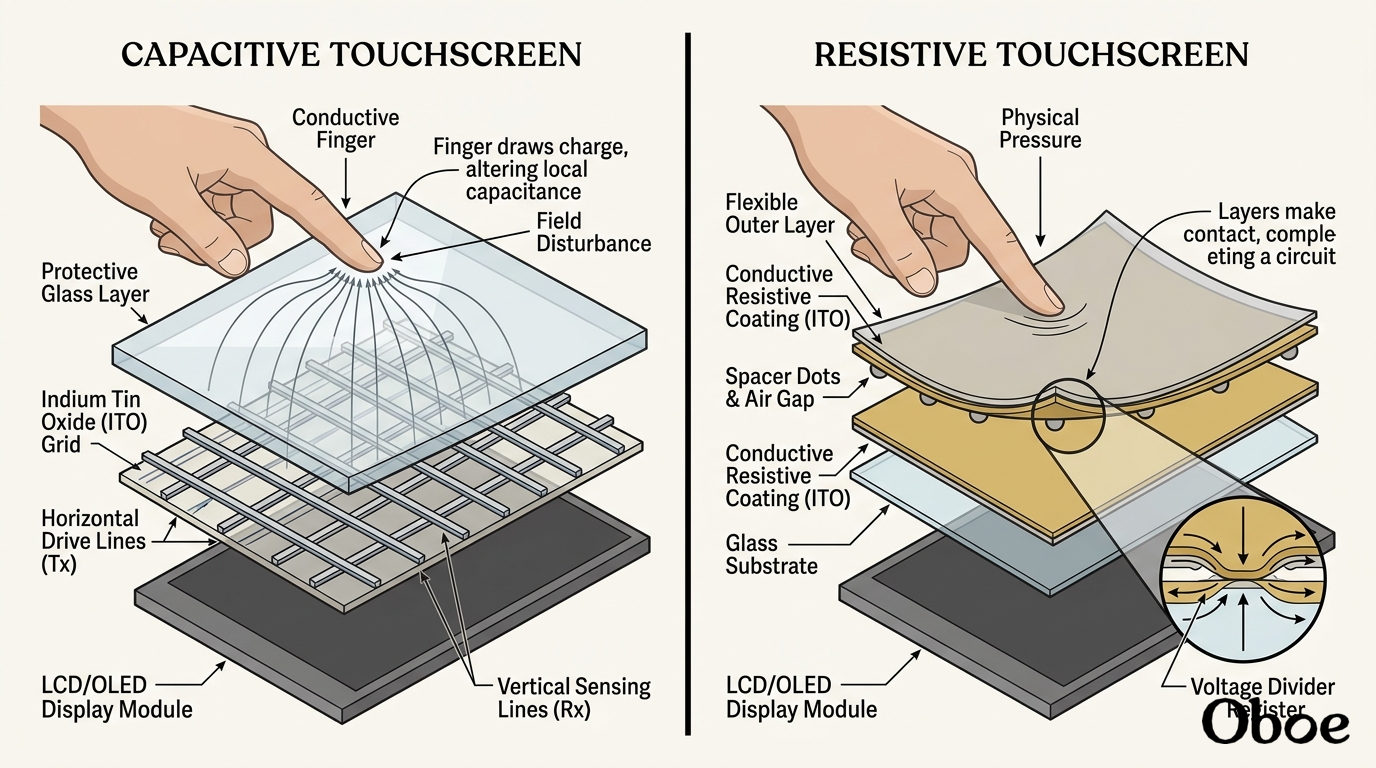
DIAG
Diagram
Generated course diagram

This diagram showcases the fundamental difference in how they detect your input.

On the left, the is entirely solid-state and relies on a continuous electrostatic grid. Because it reacts to electrical changes, it doesn't need to physically move to register a touch.

On the right, the acts like a physical switch. It requires actual mechanical pressure to bend the top layer so that it physically touches the bottom layer, completing a localized circuit.

Now that you have the visual layout down, shall we dive into the specific physics of how that capacitive electrical grid senses your finger?

Why can't capacitive screens work with standard gloves?

That is the ultimate winter dilemma, isn't it? The reason capacitive screens ignore standard gloves comes down to how your body interacts with the screen's electric field. Your body is naturally a great , meaning electrical charges can easily flow through you. Because of this, when your bare finger touches the glass, it acts like a tiny sponge—or an "electrical sink"—drawing in a microscopic amount of the screen's local electrical charge. The screen's controller registers exactly where that charge dropped and translates it into a touch.
But standard wool, leather, or cotton gloves are electrical . They do not allow electrical charges to pass through them. When you wear these gloves, they physically block your conductive skin from interacting with the screen's electrostatic field. Because your finger can no longer pull any electrical charge away, the controller on your phone detects absolutely nothing—it is as if the screen is being touched by a block of wood. Special "touchscreen-compatible" gloves solve this by weaving conductive threads (often made of silver or copper) directly into the fingertips, allowing the electrical charge to travel through the glove to your skin.

Explain how the capacitor grid itself works

To understand how the capacitive grid works, we have to look closely at a magical, transparent material called (commonly abbreviated as ITO). This compound is highly conductive but perfectly clear, allowing the display light to pass through while carrying electric currents directly beneath the glass.
Instead of a single continuous sheet, engineers use ITO to etch a highly precise, intersecting grid of microscopic electrodes directly onto the screen. This grid is divided into two separate layers:
  1. Drive lines: Horizontal rows of electrodes that continuously transmit an alternating electrical current.
  2. Sensing lines: Vertical columns of electrodes that constantly monitor and receive that current.
Because these horizontal and vertical lines cross over each other without physically touching, an is created at every single intersection point of the grid.

A touch-sensor grid of horizontal blue drive lines and vertical orange sensing lines, with electrostatic field bubbles at each intersection, showing one bubble shrunken at the point of fingertip contact.

At every one of these intersection points, a tiny capacitor is formed. Because the grid is so dense, a modern phone has thousands of these individual intersection points, mapping out a high-resolution map of electric fields across your display. Now, would you like to explore how the screen's internal controller monitors this grid to calculate the exact coordinate of your touch, or should we make a worksheet to test how well you understand the hardware layout?