GPU Programming Essentials
GPU Architecture
CPUs vs. GPUs
Your computer's Central Processing Unit (CPU) is a jack-of-all-trades. It's designed to be flexible and fast, handling a wide variety of tasks one after another with incredible speed. Think of a CPU as a master chef in a kitchen. This chef can follow any complex recipe, switching between intricate tasks like deboning a fish, creating a delicate sauce, and artfully plating the final dish. The chef is a genius at handling complex, sequential steps.
A Graphics Processing Unit (GPU), on the other hand, is a specialist. It was originally built for one main job: rendering graphics. This task involves performing the same simple calculation over and over again for millions of pixels on your screen. Instead of one master chef, a GPU is like an army of kitchen assistants. Each assistant is given a simple, repetitive task, like chopping an onion. While one assistant might be slower than the master chef at chopping a single onion, an army of a thousand assistants can chop a thousand onions in a fraction of the time.
A CPU is built for low-latency, serial processing. A GPU is built for high-throughput, parallel processing.
This fundamental difference in purpose leads to a completely different architecture. A CPU has a few very powerful cores, each packed with a sophisticated control unit and a large cache memory to quickly access data. This design makes it perfect for tasks that require quick decision-making and can't be easily broken down.
A GPU sacrifices this single-core complexity for sheer numbers. It packs thousands of smaller, simpler cores onto a single chip. These cores are less powerful individually and have smaller caches, but their strength lies in their ability to work together on the same problem.
Inside a GPU
Let's zoom in on the components that make this massive parallelism possible.
core
noun
The basic computation unit of a processor that executes instructions.
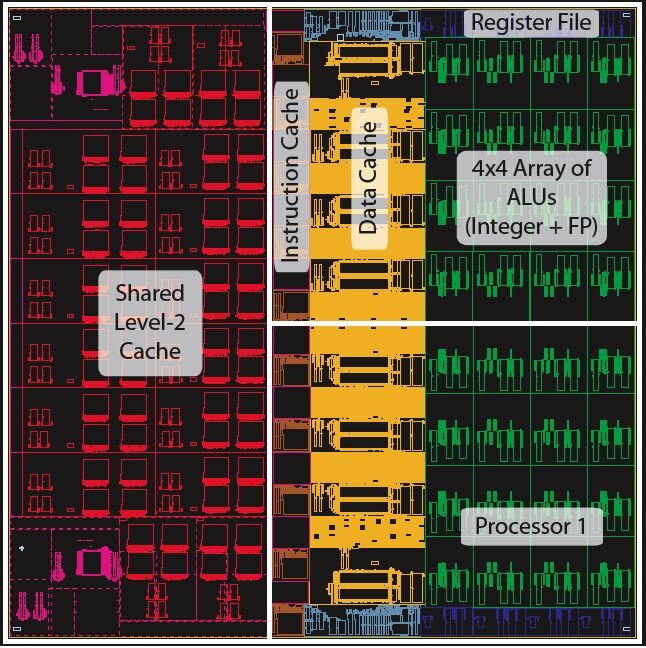
A GPU's thousands of cores are its workforce. In NVIDIA's architecture, these cores are often called CUDA Cores, while AMD calls their equivalent Stream Processors. These are the execution units that perform the actual math. They are grouped into larger blocks, known as Streaming Multiprocessors (SMs) in NVIDIA GPUs or Compute Units (CUs) in AMD GPUs. Each SM or CU has its own scheduler and a small amount of very fast local memory that its cores can share.
This hierarchical structure is key. A task is given to a group of cores (an SM or CU), which then work on it together, sharing data through their local memory. This avoids the slower process of constantly fetching data from the main memory.
The Memory Hierarchy
Just like a CPU, a GPU has a memory hierarchy, but it's optimized for a different goal: high bandwidth. The aim is to feed thousands of hungry cores with data simultaneously, not just to provide one fast core with data as quickly as possible.
At the top are the registers, which are private to each individual core. Next is the local shared memory, which is shared by all cores within a single SM or CU. This is crucial for allowing cores within a group to collaborate and share results without going to the main memory.
Further down the hierarchy is a larger L2 cache that is shared across all the SMs/CUs on the GPU. Finally, there's the main GPU memory, known as VRAM (Video RAM). This is a large pool of high-bandwidth memory that serves the entire chip. Getting data from VRAM is much slower than accessing local memory or caches, so efficient GPU programming is often about minimizing these trips.
GPUs employ a sophisticated multi-level memory system designed to feed thousands of parallel processing units:
This architecture, with its thousands of simple cores and a memory system built for massive throughput, is what gives the GPU its incredible power for parallel tasks. It’s why a component designed for video games has become an essential tool in scientific computing, machine learning, and data analysis.
Now, let's test your understanding of these architectural concepts.
Based on the provided text's analogy, which role best describes a CPU's operational style?
What is the primary design goal of a GPU's memory hierarchy?
Understanding this architecture is the first step to unlocking the computational power hidden inside these specialized processors.