GitHub Essentials for Developers
Introduction to Version Control
What Is Version Control?
Have you ever saved a file as report_final.doc, only to create report_final_v2.doc an hour later? And then, perhaps, report_REALLY_final.doc? This is a basic, manual attempt at version control. You're trying to keep a history of your changes in case you need to go back. It gets messy fast, especially when other people are involved.
A Version Control System (VCS) is software that automates this process elegantly. It tracks every change made to a project's files over time. Think of it as a detailed logbook for your project that lets you rewind to any point in its history.
At its core, a VCS helps you and your team manage changes to source code over time. It ensures that everyone is working on the most up-to-date version of a project and provides a clear history of all modifications.
Why Bother With It?
Using a VCS might seem like extra work at first, but it quickly becomes indispensable. The benefits are huge.
First, it's a safety net. If you introduce a bug or delete something important, you can easily revert to a previous, working version of your project. This freedom encourages experimentation because you know you can always undo a change that doesn't pan out.
Second, it makes collaboration seamless. A VCS allows multiple people to work on the same project simultaneously without overwriting each other's work. It provides tools to merge different changes together, even in the same file.
Finally, it provides a complete history. You can see who changed what, when they changed it, and why. This is invaluable for understanding how a project has evolved and for tracking down when a particular bug was introduced.
Two Flavors of Version Control
There are two main approaches to version control: centralized and distributed.
Centralized Version Control Systems (CVCS) operate on a client-server model. The entire history of the project is stored on a single, central server. Developers "check out" files from that central server to work on them and then "check in" their changes. Examples include Subversion (SVN) and Perforce.
The main drawback is that central server. If it goes down, nobody can collaborate or save their changes. It's a single point of failure.
Distributed Version Control Systems (DVCS) give every developer their own complete copy of the project's history. When you "clone" a project, you're not just getting the latest files; you're getting the entire database. Examples include Git, Mercurial, and Bazaar.
This distributed nature is incredibly powerful. You can work offline, commit your changes locally, and you have a full backup of the project on your machine. If the main server (like GitHub) is unavailable, you can still keep working. You can also share changes directly with other developers without needing a central server at all.
The most popular DVCS by far is Git. It's fast, flexible, and has become the standard for software development. It was created in 2005 by Linus Torvalds, the same person who created the Linux operating system kernel. He needed a better way to manage a project with thousands of contributors spread across the globe, and the existing systems weren't up to the task. The result was Git.
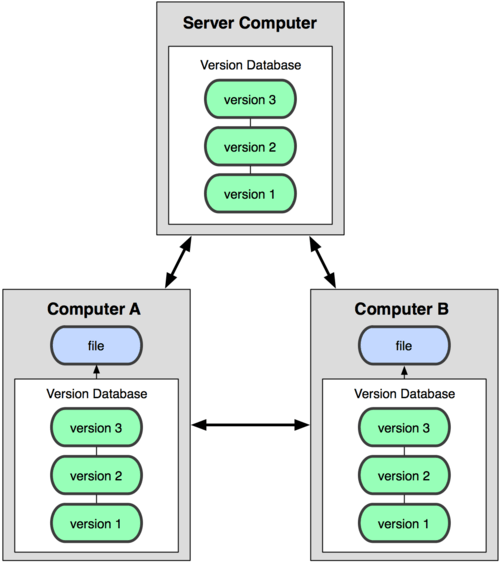
Understanding this basic concept of version control, especially the distributed model that Git uses, is the foundation for everything else we'll cover. You're not just learning a tool; you're learning a better way to work.