GitHub and Version Control Fundamentals
Introduction to Version Control
The Project Time Machine
Ever worked on a big project and ended up with a folder full of files like final_report_v2.docx, final_report_v3_with_edits.docx, and final_report_FINAL_I_mean_it_this_time.docx? It’s a confusing and risky way to keep track of changes. If you accidentally delete the wrong file or need to go back to an earlier idea, you're in trouble.
Software developers face this problem constantly, but on a much larger scale. A single project can have thousands of files, with a whole team of people making changes at the same time. Trying to manage this chaos with file naming conventions would be a disaster. This is where version control comes in.
Version Control
noun
A system that records changes to a file or set of files over time so that you can recall specific versions later.
A Version Control System, or VCS, is like a time machine for your project. It automatically tracks every change made, who made it, and when. Instead of saving dozens of nearly identical files, you have one project with a complete, detailed history. If a new change breaks something, you can instantly rewind to a version that worked. It brings order to the chaos of creation and collaboration.
Centralized vs. Distributed
Version control systems generally come in two flavors. The older model is centralized.
In a Centralized Version Control System (CVCS), a single central server holds all the project files and their history. Developers "check out" files from this server to work on them and "check in" their changes when they're done.
This model is simple to understand and manage. However, it has a major weakness: that central server is a single point of failure. If the server goes down, nobody can save their changes or collaborate. If its hard drive gets corrupted and there are no backups, the entire project history could be lost forever.
To solve this, a newer model was developed: Distributed Version Control.
In a Distributed Version Control System (DVCS), every developer has a full copy—a clone—of the entire project and its history on their local machine. There might still be a central server, but it's more for coordination than a single source of truth.
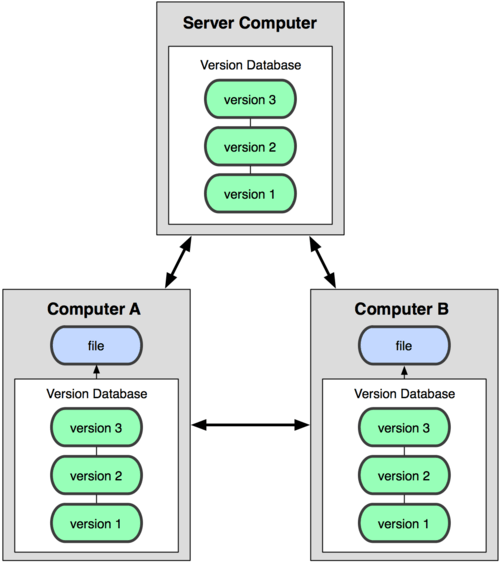
This approach is much more robust. Since everyone has a complete backup, you don't have a single point of failure. If the main server crashes, you can restore it from any developer's copy. It also allows developers to work offline, saving changes locally until they reconnect. This flexibility and safety are why distributed systems, like Git, have become the standard for modern software development.
The Benefits
Using version control isn't just about avoiding messy folders. It fundamentally improves how teams build things.
Collaboration: A VCS allows multiple people to work on the same files at the same time without overwriting each other's work. The system helps merge changes together and highlights conflicts when they arise.
History and Context: Every change is logged with a message explaining why it was made. This creates a detailed, searchable history of the project's evolution. Need to know why a certain line of code was added six months ago? The VCS has the answer.
A Safety Net: Mistakes happen. With a VCS, you can easily revert a specific file, or even the entire project, back to any previous state. This freedom from fear encourages experimentation and makes it safe to try new ideas.
Branching and Experimentation: Perhaps the most powerful feature is branching. You can create an isolated copy (a "branch") of your project to work on a new feature. This doesn't affect the main, stable version. If the feature is a success, you can merge your branch back into the main project. If it's a dead end, you can simply delete the branch, leaving the original untouched.
Now that you have a handle on the what and why of version control, let's test your knowledge.
What is the primary problem that Version Control Systems (VCS) are designed to solve?
What is the key advantage of a Distributed Version Control System (DVCS) over a Centralized one?
With this foundation, you're ready to see how these concepts are put into practice with the world's most popular version control system: Git.