GitHub Actions for Developers
Introduction to GitHub Actions
Automate Your Workflow
When you work on a software project, you end up doing the same tasks over and over. You run tests to make sure nothing is broken. You build your code into a usable application. You deploy it to a server so people can use it. These repetitive tasks are essential, but they can be tedious and prone to human error.
This is where automation comes in. By creating automated processes, you can let computers handle the repetitive work, freeing you up to focus on building new features.
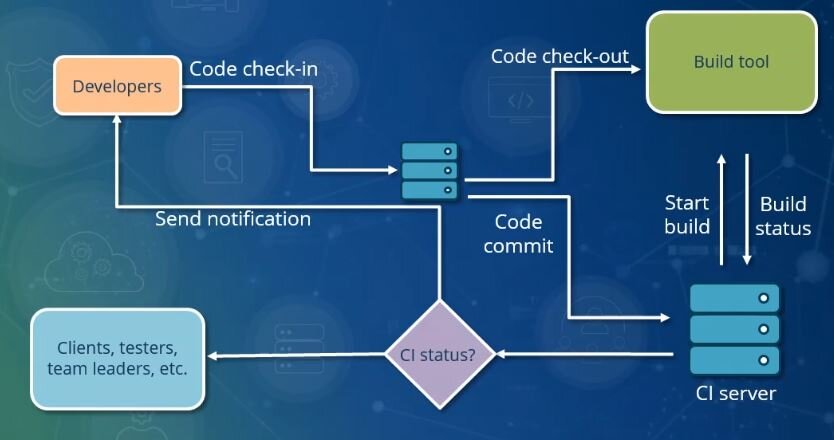
GitHub Actions is a tool built directly into GitHub that lets you automate your software development workflows. You can create custom processes that automatically run in response to events in your repository, like when someone pushes new code or opens a pull request. It’s like having a personal assistant for your project who takes care of the routine chores.
The Building Blocks
To understand GitHub Actions, you need to know its four main components. Think of it like a recipe for baking a cake.
Let's break down each part.
Workflow
noun
The entire automated process from start to finish. It's the full recipe, defining what should happen and when (e.g., 'Run tests on every push'). A repository can have multiple workflows.
Job
noun
A set of steps that run on the same virtual machine or 'runner'. Workflows are made up of one or more jobs. By default, jobs run in parallel, but you can configure them to run sequentially. In our recipe, this might be 'Bake the Cake' or 'Make the Frosting'.
Step
noun
An individual task within a job. Steps are executed in order. A step can be a simple shell command (like npm install) or a pre-packaged Action. This is a single instruction, like 'Preheat the oven to 350°F'.
Action
noun
A reusable piece of code that performs a complex but common task. GitHub provides many pre-built actions, and you can find thousands more in the GitHub Marketplace. Using an action is like using a stand mixer instead of a whisk—it's a specialized tool that makes a step easier.
Why Bother with Automation
Setting up automation takes a little time up front, but the payoff is huge. By using GitHub Actions, you create a more reliable and efficient development process.
First, it ensures consistency. Every time code is pushed or a pull request is created, the exact same set of tests and checks are run. This catches bugs early and prevents broken code from making its way into your main branch.
Second, it saves time. Instead of manually running tests and deploying code, you can let your workflow handle it automatically in the background. This frees up your team to focus on what matters: writing code and solving problems.
Finally, it provides transparency. Anyone on the team can look at the workflow file to see exactly what steps are part of your build and deployment process. They can also see the results of each workflow run, making it easy to spot and diagnose failures.
Use actions to automate repetitive tasks
This foundation gives you a mental model for how all automation on GitHub works. With these core concepts in mind, you're ready to start building your own simple workflows.
Now, let's test your understanding of these core concepts.