Git and GitHub for Beginners
Introduction to Version Control
A Time Machine for Your Work
Imagine you're writing a long report with a teammate. You email a version to your partner, who makes changes and emails it back. Meanwhile, you've also made your own changes. Now you have two different versions, and you have to manually piece them together. It’s messy and slow.
This is the problem version control systems (VCS) were built to solve. A VCS is like a time machine for your project. It’s a system that tracks every single change made to a file or set of files over time. At any point, you can recall specific versions later. This isn't just for code; it can be used for any kind of file.
A version control system allows you to revert files back to a previous state, revert the entire project back to a previous state, compare changes over time, see who last modified something that might be causing a problem, and more.
It’s a safety net. If you make a mistake, you can easily undo it by rewinding to a version from five minutes or five days ago. It also allows multiple people to work on the same project at the same time without overwriting each other's contributions. Everyone can work on their own piece, and the VCS helps merge all the changes together smoothly.
Two Styles of Teamwork
Version control systems come in two main flavors: centralized and distributed.
Centralized Version Control Systems (CVCS) are built around a single, central server that stores all the versioned files. To work on the project, you "check out" files from that central server. It’s a simple model, like a library where you borrow a book, make notes, and then return it.
This setup is easy to understand, but it has a major weakness. If that central server goes down, nobody can save their changes or collaborate. If the central database becomes corrupted and there are no backups, you lose the entire history of the project.
This brings us to the more modern approach.
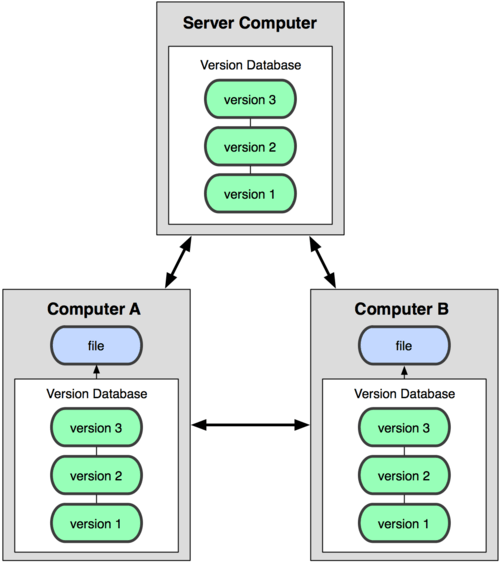
Distributed Version Control Systems (DVCS) solve the single-point-of-failure problem. In a DVCS, every developer gets a full copy of the entire project history on their own computer. They don't just check out the latest version of the files; they mirror the entire repository.
If any server dies, any of the client repositories can be copied back up to the server to restore it. Every checkout is truly a full backup of all the data. This means you can work offline, save changes locally, and then sync up with others when you have a connection. It makes collaboration more flexible and resilient.
Why It Matters
Using a version control system is a fundamental practice in modern software development. It provides a shared source of truth for a project, reducing confusion and mistakes.
Here are the key benefits:
- Collaboration: Teams can work on the same project without interfering with each other's progress.
- History: You get a complete, long-term change history of every file. You can see who made what change and why.
- Branching and Merging: You can create experimental branches to work on new features without affecting the main project. Once the feature is ready, you can merge it back in. This keeps the main codebase stable.
- Safety: Since every team member has a full copy in a DVCS, it’s very difficult to lose the project's history.
Understanding how version control works is the first step toward becoming a more effective and collaborative developer.