Git and GitHub Essentials
Introduction to Version Control
What Is Version Control?
Have you ever worked on a document and ended up with a folder full of files like report_v1.doc, report_v2_final.doc, and report_final_I_mean_it_this_time.doc? It’s a confusing way to track changes, especially when you’re working with other people. If someone makes a mistake, finding the last good version can feel like a treasure hunt with no map.
Version control systems (VCS) solve this problem. A VCS is a tool that tracks changes to files over time. Think of it as a time machine for your project. It records every change you make, who made it, and why. You can rewind to any previous point, compare different versions, and see how your project has evolved. If you mess something up, you can simply restore a past version without any panic.
A version control system is essentially a database that keeps a snapshot of every change ever made to a set of files.
While essential for software developers writing code, version control is useful for any digital project, from a team of writers working on a book to designers collaborating on a website.
Two Flavors of Control
Version control systems generally come in two main types: centralized and distributed. They both track history, but they do it in fundamentally different ways.
A Centralized Version Control System (CVCS) uses a single, central server that stores all the project's files and their history. To work on the project, you "check out" a copy of the files from that server. When you're done, you "check in" your changes. It's like a library with one master copy of a book. To make edits, you have to get permission from the central librarian.
This model is straightforward but has a major weakness: that central server is a single point of failure. If it goes offline, nobody can save their changes or collaborate. You also need a constant network connection to do almost anything.
A Distributed Version Control System (DVCS) solves these problems. Instead of just checking out the latest version of the files, every user gets a full copy of the entire project history on their own computer. Everyone has their own complete library.
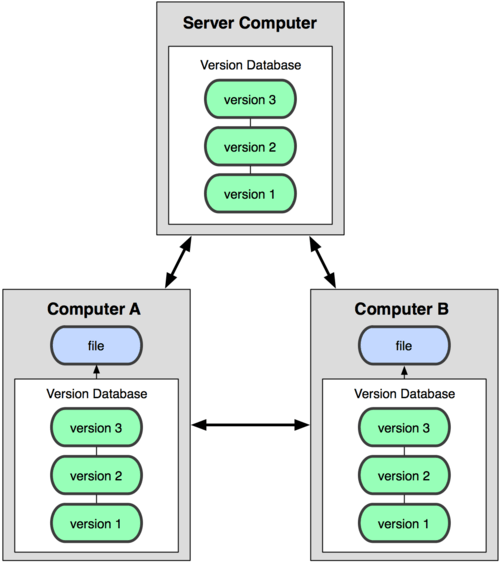
You can save changes, view history, and create new versions on your local machine without any network connection. When you're ready to share your work, you can "push" your changes to a shared server, or even directly to a teammate. This is much more flexible and resilient. If the main server is down, you can keep working and sync up later. This distributed model is the standard for most modern software development.
The Language of Version Control
All version control systems, whether centralized or distributed, share a common vocabulary. Understanding these core terms is the first step to using any VCS effectively.
Repository
noun
The database containing all your project's files, and the entire history of every change made to them. Often abbreviated as "repo."
Commit
noun
A snapshot of your files at a specific point in time. Each commit has a unique ID and a message describing what changes were made. It's like a save point in a video game.
Branch
noun
An independent line of development. You can create a branch to work on a new feature without affecting the main, stable version of the project. It's like a parallel universe for your code.
Merge
verb
The action of taking the independent changes from one branch and combining them into another. This is how a new feature developed on its own branch is integrated back into the main project.
These concepts form the foundation of version control. By understanding what they are and how they relate to each other, you're ready to explore how specific tools put them into practice.