Git 入门指南
Git简介
What is Git?
Git is a version control system. Think of it as a time machine for your project files. It tracks every change you make to your code, documents, or any other set of files. This lets you rewind to a previous version, see who changed what, and collaborate with others without stepping on each other's toes.
Version Control System
noun
A tool that tracks and manages changes to a set of files over time. It allows multiple people to work on the same project simultaneously without overwriting each other's work.
Imagine building a complex model with building blocks. You carefully add a new section, but it makes the whole structure unstable. Without version control, you'd have to painstakingly remove the new blocks. With it, you can simply revert to the last stable snapshot you saved. That's the core value: a safety net that encourages experimentation and protects your work.
Everyone Has a Copy
Git uses a decentralized, or distributed, model. This is different from older, centralized systems where one master server held all the project history. If that server went down, nobody could collaborate or save their changes.
In Git, every developer's computer holds a complete copy of the project and its entire history. You can work offline, save your changes locally, and then share them with the team when you're ready. This makes the whole system faster and more resilient. If one person's hard drive fails, the project isn't lost; it exists on everyone else's machine.
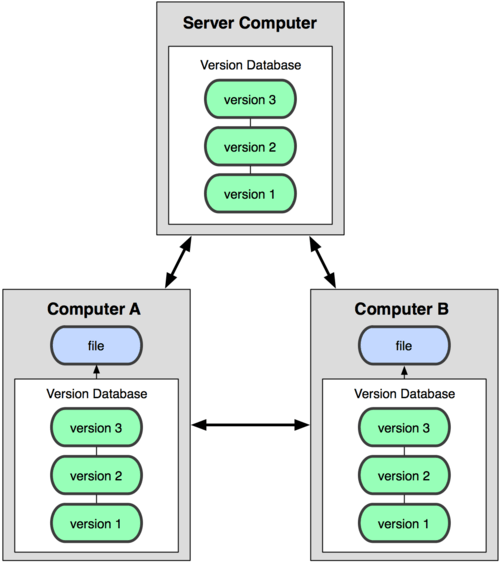
With Git, you don't just have your own files. You have the entire history of the project right on your computer.
Safe Spaces for New Ideas
One of Git's most powerful features is branching. A branch is like a parallel universe for your project. You can create a new branch to work on a new feature, fix a bug, or just experiment with an idea, all without disturbing the main, stable version of the project.
These branches are lightweight and easy to create. You can make changes, test them, and then, once you're happy, merge your branch back into the main project. If the idea doesn't work out, you can simply delete the branch, and it's as if it never happened. This allows teams to work on many different things at once without causing chaos.
All or Nothing Changes
When you save your work in Git, you create a "commit." A commit is more than just a saved file; it's a snapshot of your entire project at a specific moment. If you changed three different files to add one new feature, a single commit will bundle all three of those changes together.
This is known as an atomic commit. The changes are all recorded at once, or not at all. You'll never be in a situation where only half of a feature is saved to the project's history. This makes the history clean, logical, and easy to follow. Each commit represents a complete, working thought or change, which is incredibly helpful for understanding how a project has evolved.
Understanding these core concepts—version control as a safety net, the distributed model, flexible branching, and atomic commits—is the first step to seeing why Git is an essential tool for modern development.