Foundations of Python Programming
Python Basics
Getting Started with Python
Python is a popular programming language known for its simple, readable syntax. It’s a great starting point if you're new to coding because it lets you write powerful programs with very few lines of code.
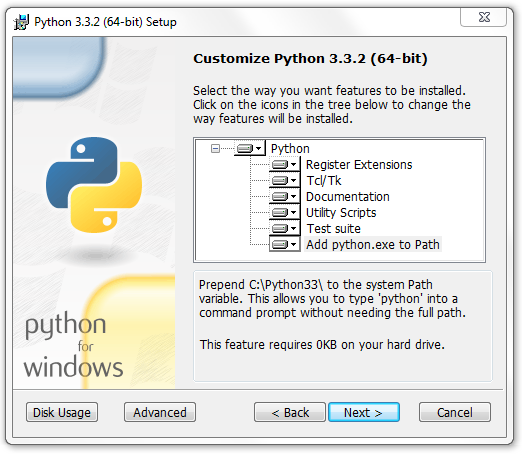
First, you need to get Python on your computer. The best place to get it is from the official website, python.org. Just download the latest version for your operating system—whether it's Windows, macOS, or Linux—and follow the installation instructions. During installation, make sure to check the box that says "Add python.exe to Path" or something similar. This makes it easier to run Python from anywhere on your computer.
Once installed, Python comes with a simple program called IDLE (Integrated Development and Learning Environment). It's a basic tool that lets you write and run Python code right away.
Your First Program
Let's write a program. It’s a tradition in programming to start with a program that just displays "Hello, World!" on the screen. In Python, this is incredibly simple.
print("Hello, World!")
That's it. This one line tells the computer to use the built-in print() function to display whatever text is inside the parentheses. The text itself is wrapped in double quotes to tell Python that it's a string—a sequence of characters.
The structure is important: the function name (
(), with the content you want to display placed inside them.
You can also leave notes in your code that the computer will ignore. These are called comments, and they start with a hash symbol (#). Comments are for humans to read, helping to explain what your code does.
# This is a comment. Python ignores it.
# The line below displays a greeting.
print("Hello, Python!")
Storing Information
Programs need to work with data, and we often need to store that data somewhere to use it later. We do this using variables. Think of a variable as a labeled box where you can keep a piece of information. You give the box a name, and you can put things in it, take things out, or replace what's inside.
# Create a variable named 'message' and store a string in it
message = "Welcome to programming"

# Display the content of the variable
print(message)
Here, message is the variable name, and the = sign is the assignment operator. It assigns the value on the right to the variable on the left. When we print(message), Python looks up the value stored in the message variable and displays it.
You can change a variable's value at any time.
message = "Welcome to programming"
print(message)

# Now, change the value
message = "Python is fun"
print(message)
Python supports different types of data, and variables can hold any of them. The type is determined automatically based on the value you assign.
| Data Type | Description | Example |
|---|---|---|
String (str) | A sequence of characters. | "Hello" or 'Python' |
Integer (int) | A whole number. | 10, -5, 2024 |
Float (float) | A number with a decimal point. | 3.14, -0.5, 99.0 |
Boolean (bool) | Represents truth values. | True or False |
Let's see these in action.
user_name = "Alex"         # String
age = 25                   # Integer
height = 5.9               # Float
is_learning = True         # Boolean

print(user_name)
print(age)
Input and Output
We've already used print() to send output to the screen. But what if we want to get input from the user? For that, we use the input() function. It pauses the program and waits for the user to type something and press Enter.
# Prompt the user for their name
name = input("What is your name? ")

# Greet the user with their name
print("Hello, " + name + "!")
The text inside the input() parentheses is the prompt that gets displayed to the user. Whatever the user types is returned as a string and, in this case, stored in the name variable. We then use the + operator to combine, or concatenate, the string "Hello, " with the user's name and an exclamation mark to create a personalized greeting.
Let's try getting a number from the user.
# Get the user's age as a string
age_string = input("How old are you? ")

# Convert the string to an integer
age_number = int(age_string)

# Calculate their age next year
age_next_year = age_number + 1

# Print the result
print("Next year, you will be " + str(age_next_year))
Notice we used int() to convert the input string to an integer so we could do math with it. Then, we used str() to convert the final number back into a string so we could join it with the other text for printing. You can only concatenate strings with other strings.
When installing Python, what is a crucial step to ensure it can be easily run from any command line or terminal window?
Which line of code correctly prints the text "Hello, World!" to the screen?
You now have the basic building blocks for writing simple Python programs. You know how to display messages, store information, and interact with a user.