Exploring Dynamic Design
Introduction to Dynamic Design
Bringing Designs to Life
Think about the apps you use every day. When you tap a button, does it just instantly change the screen, or does it smoothly transition? When you pull down to refresh, does the new content just appear, or is there a subtle animation? That movement, that life, is the essence of dynamic design.
Dynamic design uses motion, animation, and interactive elements to create a more engaging and intuitive experience. It's not just about making things look cool. It’s about communication. Good dynamic design guides your eye, provides feedback, and makes a digital product feel more natural and responsive to your actions.
Effective motion design turns a series of static screens into a fluid, understandable journey for the user.
From Static to Interactive
The early internet was like a digital magazine. Websites were static pages of text and images. You could click a link, and a completely new page would load. There was no sense of transition or flow, just an abrupt jump from one state to another.
Technological advancements changed everything. As internet connections got faster and tools like CSS and JavaScript became more powerful, designers could finally add motion to their work. Interfaces started to feel less like static documents and more like interactive spaces. Buttons could change color when you hovered over them. Menus could slide out smoothly. Content could fade in gracefully.
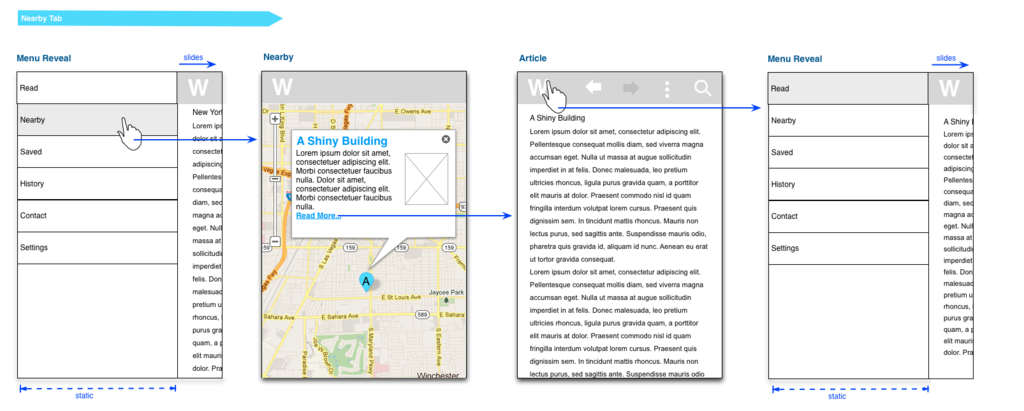
This shift was huge. Motion stopped being just a decorative element in videos and became a core part of user interface (UI) design. It allowed designers to tell a story, explain how different parts of an interface are connected, and make technology feel more human.
motion has become a significant mobile design element
Core Principles of Dynamic Design
Good dynamic design isn't random. It follows a few foundational principles to ensure it's helpful, not distracting.
User-Centered Design: Every animation and transition should have a purpose that benefits the user. Does it show where a new item on a list came from? Does it confirm that an action was successful? Motion should add clarity and reduce cognitive load, not create confusion.
Consistency: The way elements move should be consistent throughout the product. If a menu slides in from the left on one screen, it should do the same on all other screens. This predictability makes the application feel stable, polished, and easier to learn.
Responsiveness: This principle is about feedback. When a user interacts with something, the interface should respond immediately to acknowledge the action. This can be as simple as a button changing shape when pressed or a loading spinner appearing when data is being fetched. This feedback confirms that the system is working and makes the interaction feel tangible.
What is the primary goal of dynamic design?
Which principle of dynamic design states that the interface should immediately acknowledge a user's action?