Demystifying the Internet for Website Creation
Internet Basics
A Network of Networks
The internet isn't a single thing or a place. It's a global network of interconnected computers. Think of it like a massive, worldwide postal system, but for digital information. This system began in the late 1960s as a U.S. military project called ARPANET. The goal was to create a communication network that could survive a disaster. If one part of the network was destroyed, messages could still find a way to their destination through another route.
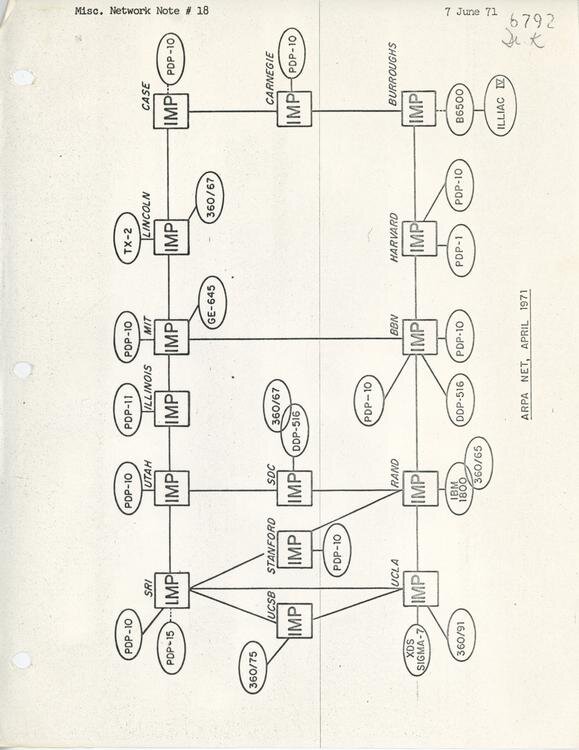
This idea of a decentralized, resilient network is still at the heart of the internet today. Over the decades, ARPANET grew. Universities and research institutions joined, and it eventually transitioned from a government project to a global public resource. The invention of the World Wide Web in 1990 by Tim Berners-Lee made it accessible to everyone, not just computer scientists. The web provided a graphical way to navigate the internet, using browsers and hyperlinks, turning a complex system into the user-friendly tool we know today.
How Information Travels
When you send an email or load a webpage, the data doesn't travel in one big piece. Instead, it's broken down into small, manageable chunks called packets. Each packet is like a tiny digital postcard. It contains a small part of the total information, along with the sender's address and the destination's address. This process is called packet switching.
Breaking data into packets allows for efficiency and reliability. If one packet gets lost or corrupted, only that small piece needs to be resent, not the entire file.
These packets travel from your computer to your local internet service provider (ISP). From there, they leapfrog across a vast network of specialized computers.
Key Internet Hardware
Several key devices work behind the scenes to direct your data packets to the right place. You probably have at least one of them in your home.
Router
noun
A device that directs data packets between computer networks. Routers act like traffic cops, inspecting the destination address on each packet and sending it along the most efficient path.
While a router connects different networks, a switch connects devices within the same local network, like in an office or home. Think of it as a local mail sorter for devices that are already in the same building.
Finally, there are servers. A server isn't a special type of computer so much as a computer with a special job. It's a powerful computer that is always on, ready to "serve" information to other computers (called clients) that request it. When you visit a website, your computer is a client requesting data from a web server.

Finding Your Way with IP Addresses
How do routers know where to send packets? Every device connected to the internet has a unique identifier called an Internet Protocol (IP) address. It's the digital equivalent of a street address for your computer, phone, or any other connected device.
An IP address is a series of numbers separated by periods, like 192.168.1.1 or 208.67.222.222. This address ensures that the packets you send get to the right destination, and that the packets you request—like the data for a webpage—can find their way back to you.
Without IP addresses, data packets would be lost, and the internet couldn't function. They provide the fundamental addressing system for all online communication.
You can think of your IP address as the main address for your house, while specific requests for data, like loading a video or checking email, are directed to different "rooms" or ports at that address. We'll explore that concept later. For now, just remember that the IP address is the key to locating any device on the vast network of networks.
Let's check your understanding of these core concepts.
The internet began as a U.S. military project with what primary goal?
When you send an email, the data is broken down into small chunks called ________ before being sent across the network.