CPU Scheduling Explained
Introduction to CPU Scheduling
The CPU's Juggling Act
Your computer seems to do dozens of things at once. You might be streaming music, browsing the web, and receiving email notifications, all while your antivirus software runs in the background. But in reality, a typical CPU core can only execute one instruction at a time. The illusion of doing everything at once is thanks to a clever process called CPU scheduling.
Think of the CPU as a master chef in a busy kitchen. The chef can only cook one dish at a time, but many orders (processes) are waiting. The chef has to decide which order to work on next. Should they tackle the quick appetizer first to get something out to a hungry customer quickly? Or should they start the slow-roasting dish that will take hours? This decision-making process is CPU scheduling.
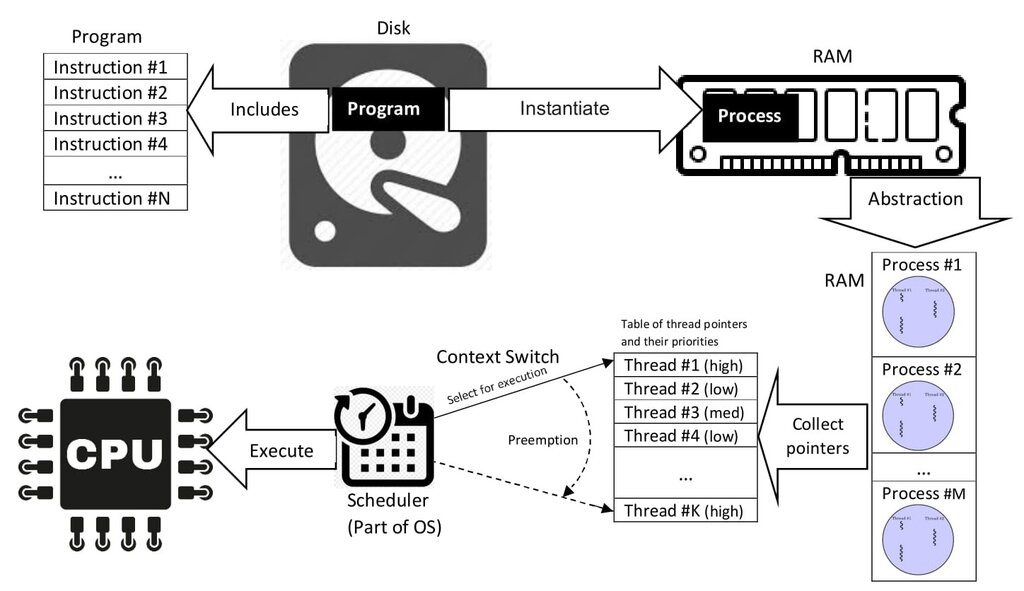
In a computer, the operating system's CPU scheduler acts as the head chef. It's the component that looks at all the processes ready to run and picks which one gets to use the CPU next. Its goal is to manage these processes so that the system feels responsive, stays busy, and completes work efficiently. Without scheduling, it would be chaos. The first program you opened might hog the CPU forever, forcing every other application to a standstill.
What Makes a Good Schedule?
A scheduler constantly makes trade-offs. Prioritizing one goal, like finishing a big video rendering job as fast as possible, might make the system feel sluggish for simple tasks like typing. Schedulers are designed to balance several competing objectives.
The main objectives of CPU scheduling are to keep the CPU as busy as possible, complete work quickly, and provide a responsive experience for the user.
To know if a scheduling strategy is effective, we need to measure its performance. Computer scientists use a few key metrics to evaluate how well a scheduler is doing its job. These metrics help us understand the trade-offs and choose the right approach for a given system, whether it's a smartphone, a web server, or a supercomputer.
The Five Key Metrics
Let's break down the five standard metrics used to judge a CPU scheduler's performance. Imagine you're at a popular coffee shop to help understand these concepts. The barista is the CPU, and the customers are the processes.
CPU Utilization
noun
The percentage of time that the CPU is busy executing processes.
You want the barista to be making drinks as much as possible, not just standing around. A busy barista means the coffee shop is running efficiently. Similarly, we want the CPU to be actively working, not sitting idle. High utilization (typically 40% to 90%) means your hardware isn't going to waste.
Throughput
noun
The number of processes completed in a given unit of time.
This is how many customers get their coffee per hour. A high throughput means the shop is serving a lot of people. For a computer, it means a lot of tasks are being finished, which is great for systems that handle many jobs, like a web server processing user requests.
Turnaround Time
noun
The total time that elapses from when a process is submitted until it is completed.
This is the total time a customer spends in the coffee shop, from walking in the door to walking out with their drink. It includes ordering time, waiting time, and the time it takes to make the drink. For a computer process, it's the total time from start to finish. You almost always want to minimize this.
Waiting Time
noun
The total amount of time a process spends waiting in the ready queue, waiting for its turn on the CPU.
This is a component of turnaround time. It's the time the customer spends just waiting in line and waiting for their name to be called after they've ordered. It's not the time the barista is actively making their drink. Reducing waiting time is key to making a system feel efficient, as no process should be stuck waiting for too long.
Response Time
noun
The time from when a request is submitted until the first response is produced, not the final output.
This is how long it takes from the moment a customer finishes ordering until the barista starts making their specific drink. The customer gets an immediate sense of progress. For a computer, this is critical for interactive systems. When you click an icon, you want to see the program start to open immediately, even if it takes a few more seconds to fully load. A low response time makes a system feel fast and responsive.
| Metric | What It Measures | Analogy (Coffee Shop) |
|---|---|---|
| CPU Utilization | % of time CPU is busy | % of time barista is making drinks |
| Throughput | Processes completed per hour | Customers served per hour |
| Turnaround Time | Total time from start to finish | Total time spent in the shop |
| Waiting Time | Time spent waiting for CPU | Time spent waiting in line |
| Response Time | Time to first reaction | Time until your drink is started |
These five metrics provide the language to discuss and compare different scheduling strategies. There is no single "best" strategy. A scheduler for a smartphone will prioritize response time to feel snappy, while a scheduler for a scientific supercomputer might prioritize throughput and utilization to crunch as much data as possible. Understanding these fundamentals is the first step toward exploring the specific algorithms that make modern computing possible.
What is the primary role of a CPU scheduler in an operating system?
A web server is designed to handle thousands of user requests quickly. Which CPU scheduling metric would be most critical for measuring its performance in completing these requests?