Betaflight Setup for Whoop Drones
Introduction to Betaflight
Meet Your Drone's Brain
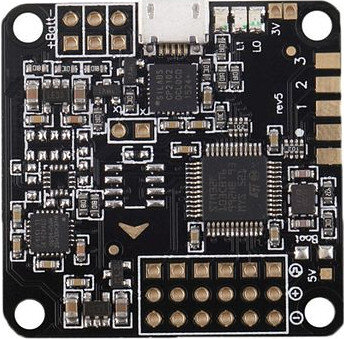
Every FPV drone has a flight controller, a small circuit board that acts as its central nervous system. It processes information from the drone’s sensors and the commands from your radio controller, then tells the motors how to spin to make the drone fly the way you want.
The flight controller is the drone’s “brain,” processing data from sensors and inputs from the user to maintain stable flight.
But a brain needs software to function, and for most FPV drones, that software is Betaflight. Betaflight is open-source firmware—a type of specialized software that runs directly on the flight controller hardware. It’s the magic that translates your stick movements into precise, stable flight. Because it's open-source, a massive community of pilots and developers constantly improves it, adding new features and refining its performance. This customizability is what allows pilots to tune their drones to fly exactly how they like.
The Configurator Control Panel
You don't interact with the Betaflight firmware directly. Instead, you use a free desktop application called the Betaflight Configurator. Think of it as the control panel for your drone's brain. You connect your drone to your computer via USB, open the Configurator, and you gain access to every setting imaginable.
This tool is how you set up a new drone from scratch, diagnose problems, and fine-tune its flight characteristics. The interface might look intimidating at first, with its many options and graphs, but it's logically organized into a series of tabs on the left-hand side. Each tab manages a specific part of the drone's setup.
A Quick Tour of the Tabs
Getting comfortable with Betaflight starts with knowing what each tab does. You won't need to master every single setting, but understanding the purpose of the main tabs is key. Here’s a quick rundown of the ones you'll use most often.
| Tab | Purpose |
|---|---|
| Setup | Calibrate your drone's accelerometer so it knows which way is level. |
| Ports | Tell the flight controller how it communicates with other parts, like your receiver and video transmitter. |
| Configuration | The main hub for setting core flight characteristics and enabling features. |
| Receiver | Check that your radio controller's stick inputs are being received correctly. |
| Modes | Assign switches on your controller to actions like arming the drone or changing flight modes. |
| Motors | Test individual motors to ensure they spin correctly and in the right direction. |
| PID Tuning | Adjust the core flight performance, making the drone feel sharp and locked-in or smooth and cinematic. |
| OSD | Customize the On-Screen Display you see in your FPV goggles, like battery voltage and flight time. |
These tabs are the building blocks for configuring your drone. In the upcoming steps, we'll walk through how to use them to get your Whoop drone ready for its first flight.
Ready to check your understanding?
What is the primary role of a flight controller in an FPV drone?
What is Betaflight?
Now that you have a high-level view of what Betaflight is and how it's organized, you're ready to connect your drone and start the configuration process.