AWS Cloud Computing Essentials
Introduction to Cloud Computing
What Is Cloud Computing?
Think about the electricity in your home. You don't own a power plant in your backyard. Instead, you plug into a massive, shared grid and pay for what you use. Cloud computing works on a similar principle, but for digital resources like storage, databases, and processing power.
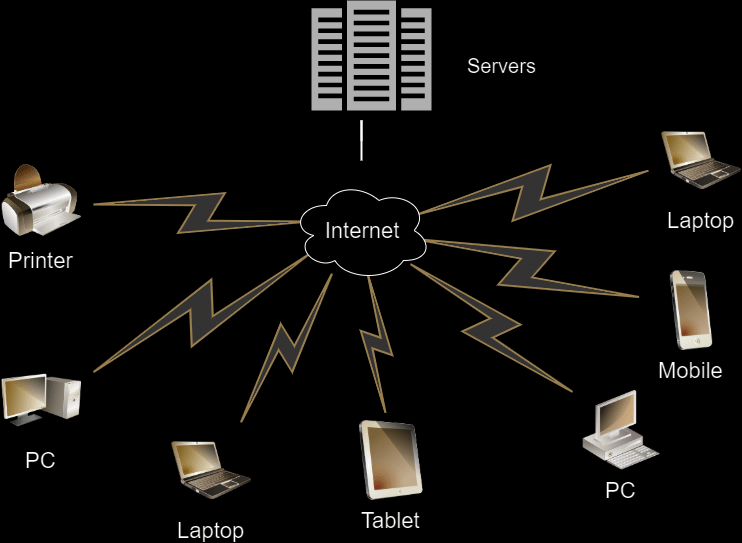
Cloud computing is the delivery of computing services—servers, storage, databases, networking, software, analytics, and intelligence—over the internet (“the cloud”).
Instead of buying, owning, and maintaining your own physical servers and data centers, you can access these services from a cloud provider like Amazon Web Services (AWS). This on-demand model means you get the resources you need, right when you need them, without the hefty upfront costs and management headaches.
Key Benefits
Why has cloud computing become so popular? It boils down to a few key advantages.
First, there's cost. With the cloud, you trade large upfront expenses for hardware with a variable cost based on your actual usage. This pay-as-you-go model is often much more economical.
Second is agility and speed. In a traditional setup, getting a new server could take weeks. In the cloud, you can provision powerful computing resources in minutes, allowing you to experiment and innovate much faster.
Finally, the cloud offers incredible elasticity. If your website suddenly gets a surge of traffic, you can instantly scale up your resources to handle the load. When traffic dies down, you can scale back down so you aren't paying for capacity you don't need. You can also easily deploy your applications in data centers all over the world, bringing them closer to your users for a better experience.
Cloud Service Models
Cloud computing isn't a one-size-fits-all solution. It comes in different service models, each offering a different level of control and management. The three main models are Infrastructure as a Service (IaaS), Platform as a Service (PaaS), and Software as a Service (SaaS).
Let's use a pizza analogy to break it down.
| On-Premises | IaaS | PaaS | SaaS | |
|---|---|---|---|---|
| Analogy | Pizza made at home | Take-and-bake pizza | Pizza delivery | Dining out |
| You Manage | Everything: oven, dough, toppings, cooking, table, drinks | Cooking, table, drinks | Table, drinks | Just yourself |
| Provider Manages | Nothing | The store, oven, dough, toppings | The pizza | Everything |
| Example | Building your own server rack | DigitalOcean, AWS EC2 | Heroku, Google App Engine | Gmail, Salesforce |
IaaS
noun
Infrastructure as a Service. This is the most basic category. You rent IT infrastructure—servers, virtual machines, storage, and networks—from a cloud provider.
With IaaS, you have the most control. You're responsible for managing the operating system, data, and applications.
PaaS
noun
Platform as a Service. This model provides an on-demand environment for developing, testing, delivering, and managing software applications.
PaaS handles the underlying infrastructure for you, so you can focus on building and managing your applications.
SaaS
noun
Software as a Service. This is a method for delivering software applications over the Internet, on demand and typically on a subscription basis.
With SaaS, the cloud provider manages everything, from the hardware to the software itself. You just connect to the application over the internet, usually with a web browser. Think of services like Google Docs or Dropbox.
Cloud Deployment Models
Beyond the service model, you also have to consider where the cloud infrastructure lives. This leads to three main deployment models: public, private, and hybrid.
Public Cloud: Owned and operated by a third-party cloud service provider (like AWS, Google Cloud, or Microsoft Azure), who deliver their computing resources over the internet. In a public cloud, you share the same hardware, storage, and network devices with other organizations or "tenants."
Public clouds offer massive economies of scale and remove the need for you to purchase hardware.

Private Cloud: Computing resources are used exclusively by a single business or organization. A private cloud can be physically located in the company’s on-site data center, or it can be hosted by a third-party service provider.
This model offers more control and privacy, which is important for industries with strict regulatory requirements.
Hybrid Cloud: A combination of public and private clouds, bound together by technology that allows data and applications to be shared between them. This gives businesses greater flexibility and more deployment options.
For example, a company might use its private cloud for sensitive data while using the public cloud to run applications that need to scale quickly and handle spikes in demand.
Understanding these basic building blocks—the service models and deployment models—is the first step to navigating the world of cloud computing.
Ready to test your knowledge? Let's see what you've learned.
Which of the following best describes the typical pricing model for public cloud computing?
What is the primary advantage of cloud 'elasticity'?