Android App Development with Java and Kotlin
Introduction to Android Development
What is Android?
Android is more than just the operating system on your phone. It's a complete software stack, a layered environment that includes the OS, middleware, and key applications. Think of it like a multi-layer cake, where each layer provides different services to the layer above it.
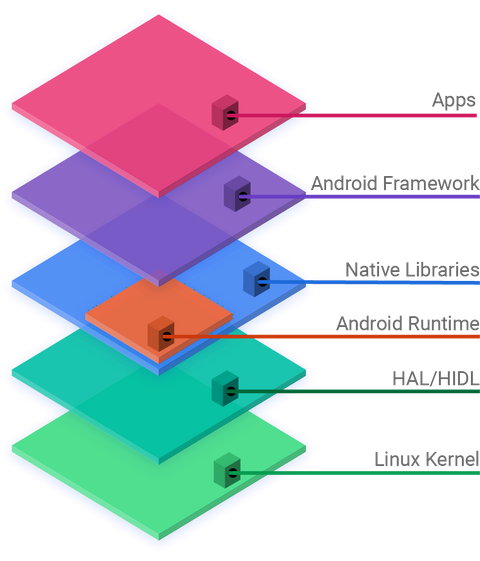
At the bottom is the Linux Kernel, the foundation that manages the device's hardware, like the processor, memory, and drivers. Above that, the Hardware Abstraction Layer (HAL) provides a standard interface for hardware vendors to work with.
The Android Runtime (ART) and Native C/C++ Libraries sit on top of the HAL. ART is where your app's code runs. The native libraries handle tasks like graphics rendering and data storage.
Next is the Java API Framework, which provides the building blocks developers use to create apps, like UI elements and notification managers. Finally, at the very top, are the System Apps (like Phone, Contacts, and Browser) and all the other apps you install.
Your Development Toolkit
To build Android apps, you'll need an Integrated Development Environment, or IDE. An IDE bundles together all the tools you need: a code editor, a compiler to build your app, a debugger to find errors, and an emulator to test your app on a virtual device.
The official IDE for Android development is Android Studio. It's your command center for building, testing, and preparing your apps for the world.
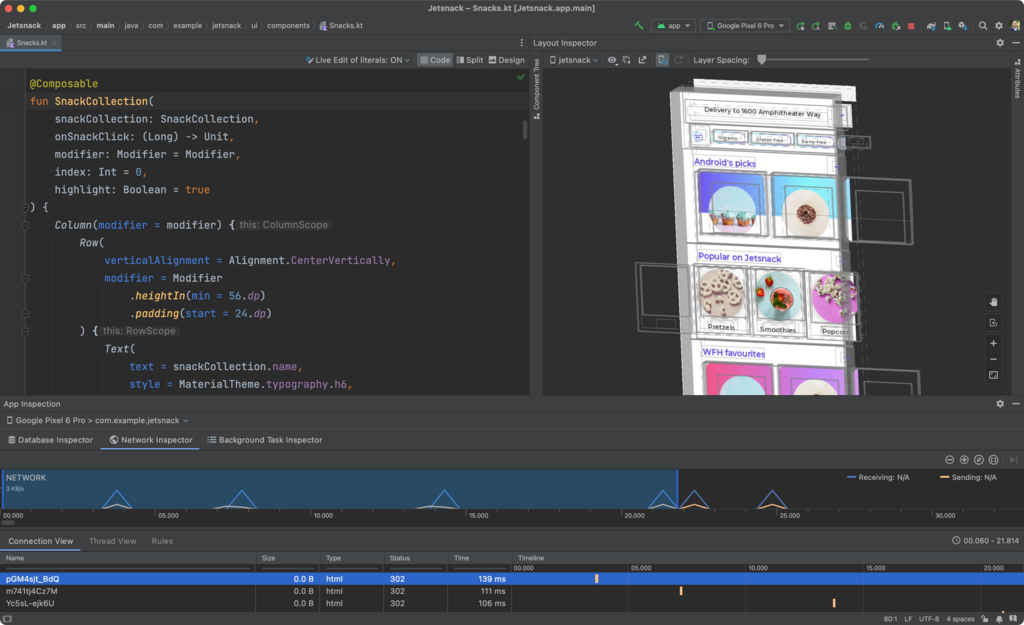
Setting up Android Studio is straightforward. You can download it directly from the official Android developer website. The installation wizard will guide you through setting up the necessary components, including the Android SDK (Software Development Kit), which contains the libraries and tools required to build apps.
Anatomy of a Project
When you create a new project in Android Studio, it doesn't start with a blank page. Instead, it generates a standard file and folder structure. This organization helps keep your code, resources, and configuration files neatly separated.
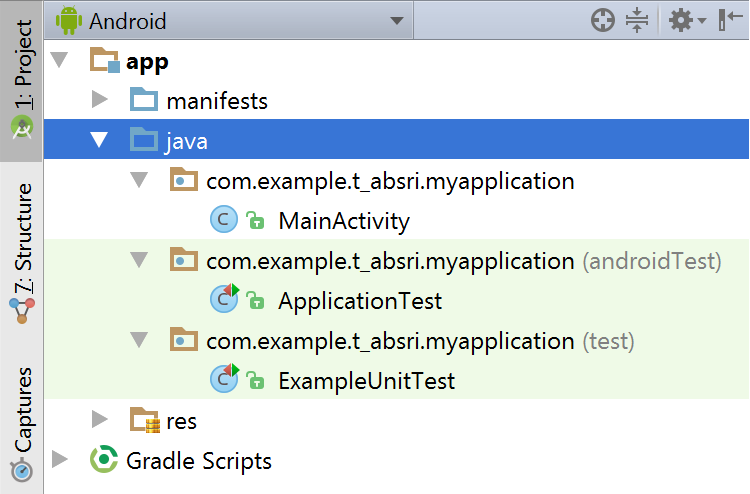
Here are the key parts you'll interact with most:
-
java: This folder contains your app's source code, written in either Kotlin or Java. This is where you'll define your app's logic and behavior. -
res(resources): This is where you store everything that isn't code. It's further divided into subfolders for layouts (layout), images (drawable), text strings (values), and more. Separating resources from code makes it easier to manage and update your app's appearance. -
AndroidManifest.xml: Think of this file as your app's passport. It's an XML file that declares essential information about your app to the Android system, such as its name, icon, and the components it contains. The system needs this information before it can run any of your app's code.
The Building Blocks
An Android app isn't just one big block of code. It's a collection of independent but interconnected components. The four main types of components are Activities, Services, Broadcast Receivers, and Content Providers. Each serves a distinct purpose and has a specific lifecycle.
Activity: An Activity represents a single screen with a user interface. For example, an email app might have one activity that shows a list of new emails, another activity for composing an email, and a third for reading a specific email. Your app will likely be a collection of activities that users navigate through.
Service: A Service is a component that runs in the background to perform long-running operations without a user interface. Think of a music app that continues playing audio even after you've switched to another app. That's a service at work.
Broadcast Receiver: This component responds to system-wide broadcast announcements. Apps can register to receive specific broadcasts. For example, the system sends out a broadcast when the battery is low or when a picture is taken. A broadcast receiver can listen for these events and trigger an action.
Content Provider: A Content Provider manages a shared set of application data. Through a content provider, the data from one application can be made available to other applications. For instance, the contact information on your device is managed by a content provider, so other apps can request permission to access it.
Now that you understand the basic concepts, let's check your knowledge.
What is the primary role of the Linux Kernel in the Android software stack?
You are building a music player app. Which component would be most appropriate for playing music in the background, even when the user navigates to another app?
Understanding these core ideas is the first step on your journey to becoming an Android developer.