
i want to start posting on linkedin or using linkedin strategically to get jobs but i dont know where to start/what actially moves the needle
Welcome! It's completely natural to feel overwhelmed by LinkedIn because there's so much noise out there, but we can absolutely cut through that and focus only on what actually moves the needle.
To make sure we tailor this strategy perfectly to your background in , sales management, education, and content creation, I'd love to know: what specific target roles or industries are you aiming for right now, and would you prefer focusing first on optimizing your profile for recruiters to find you, or developing a game plan for posting content?
I want to share my career transition journey and focus on posting content.
Because you have an incredible mix of STEM, sales, education, and content creation, you have a massive unfair advantage. You aren't starting from scratch; you're translating existing super-powers into a new context. Let's look at how your background maps to high-impact post themes.
| Your Background | The "Translation" Angle | What It Proves to Recruiters |
|---|---|---|
| STEM & Technical | "Here is how I broke down and solved this complex technical challenge today." | Analytical capacity and hands-on skills. |
| Sales Management | "How data/tech changes the way we think about customer metrics or team scale." | Commercial awareness and business acumen. |
| Education & Content | "Simplifying this incredibly complex topic into a simple 3-step analogy." | Communication, leadership, and stakeholder management. |
Give me an example of a "documenter" post
I'd love to! Let's look at a concrete example of a "documenter" post tailored specifically to your unique background.
Imagine you are transitioning into a data analytics or technical product role, and you want to show off your STEM problem-solving skills alongside your education and communication background. Here is exactly how that post would look on your feed:
The "Behind-the-Scenes" Log: Finding the Hidden Loophole
I used to think that was something you only read about in textbooks.
Yesterday, I was working on a Python script to analyze customer conversion rates for a mock sales campaign. On paper, the math was simple. But when I ran the dataset, the numbers made zero sense—it looked like half our customers had vanished into thin air.
Instead of wiping the database, I put on my teacher hat and decided to explain the problem out loud to myself.
That's when I spotted it: a classic data formatting error. The system was treating "0" and "NULL" as the exact same thing, which completely skewed the averages.
I rewrote the cleanup function to handle empty cells properly, and suddenly, the dashboard painted a perfect picture of where the sales pipeline was leaking.
Two big lessons from this struggle:
- The hardest part of technical work isn't writing the code; it's translating the real-world messiness of human behavior into clean logic.
- Sometimes the best way to debug a technical system is to explain it as if you're teaching it to a class.
For my fellow data folks: What is the most frustrating database formatting error you've had to clean up this week?
This works because you aren't claiming to be the world's leading database architect. You are simply documenting a real problem you faced yesterday, how you solved it, and what you learned from it. Next, let's break down the hidden mechanics of why this format is so magnetic to hiring managers.
Create a template document of different post formats
I'm on it! I have put together a comprehensive template document mapping out three of the highest-ROI post formats specifically designed to translate your multi-disciplinary background into recruiter magnets.
I've kicked off the generation of that document for you! It includes plug-and-play templates for The Documenter, The Analogy, and The Pillar Shift post formats, complete with structural breakdowns of how to apply them to your specific background.
While that document is baking, let's look at the underlying of that Python/data cleanup post we just looked at. Knowing why a post works is the secret to writing them consistently without running out of steam.
| Section | The Mechanics | What It Does to the Reader |
|---|---|---|
| The Hook | "I used to think that clean data was..." | Disrupts a common belief and forces them to click "...see more." |
| The Conflict | "But when I ran the dataset, the numbers made zero sense..." | Introduces real-world stakes. Recruiters want to see how you handle friction. |
| The Resolution | "Instead of wiping it, I put on my teacher hat..." | Highlights your unique cross-functional superpower (Education + STEM). |
| The Takeaway | "1. The hardest part isn't the code..." | Delivers transferable, high-level business wisdom, proving strategic thinking. |
| The CTA | "For my fellow data folks: What is..." | Drives comments, which signals the LinkedIn algorithm to boost your reach. |
Do you see how we intentionally highlighted your "teacher hat" to solve a technical "STEM" problem? That is how you turn a simple technical fix into a story about your unique, multi-disciplinary value.
How does this breakdown feel to you? Once you're ready, we can talk about a simple system to generate endless post ideas like this weekly without hitting creative burnout.
Continue to building a consistent post-generation system
It is completely normal to wonder how people keep up with posting without turning it into a stressful second job, but the secret is that they do not write from scratch every day. Instead, they use a highly predictable system to turn random thoughts into structured posts without the constant pressure of a blinking cursor.
The 3 Step LinkedIn Engine
To keep your feed active while you focus on your job search, you only need to master three simple habits: Idea Capture, Weekly Batching, and the 3-2-1 Content Engine.
| Phase | What You Do | Why It Saves Your Sanity |
|---|---|---|
| 1. Idea Capture | Jot down quick thoughts, bugs solved, or classroom analogies into a raw notes app immediately. | You never sit down to write with a blank mind. |
| 2. Weekly Batching | Spend just 45 minutes on Sunday transforming those raw notes into 3 structured posts. | Eliminates the daily friction and dread of "what should I post today?" |
| 3. The 3-2-1 Engine | Post 3 times a week, leave 2 thoughtful comments a day, and send 1 direct message to a peer. | Builds deep consistency and algorithm traction with minimal daily effort. |
Think of as your raw material warehouse. If you try to sit down and force yourself to 'be creative' on command, you will experience burnout in a week. But if you simply keep a running list of real-world bugs, sales metrics, or teaching moments as they happen, you will have an endless supply of stories.
With this system, you only need to actively write once a week. You take your raw notes, run them through the Hook-Conflict-Resolution framework we just mapped out, and schedule them. On a daily basis, your only task is to log on for 10 minutes to engage with others.
Now, let's put this system into action right away with a quick, hands-on exercise. Think of a technical tool you've used recently, a business concept you taught someone, or a project hurdle you had to leap over. We are going to draft three distinct hook options using your real experiences to see how easy it is to find your stories.
Give me some prompts to spark my first raw ideas
Ask and you shall receive! To get your content engine humming, let's tap directly into your unique professional intersections. Here are three highly tailored raw prompts based on your STEM, sales management, and educational backgrounds. Pick the one that jumps out at you first, and we'll use it to craft your very first hooks.
Your Custom Spark Prompts
| Background Angle | The Raw Idea Prompt | What It Simmers Down To |
|---|---|---|
| 1. The STEM Solver | Think of a technical tool, logic bug, or data issue you recently wrestled with. How did you diagnose it? | "I thought [Tool/Method] was simple, until it broke in this specific way..." |
| 2. The Sales Translator | What is a core sales management or team metric (like pipeline conversion or client retention) that actually behaves exactly like a technical system? | "Everyone in sales tracks [Metric], but technical teams call it [Tech Term]—and they both break the same way." |
| 3. The Educator's Lens | What is a highly dense, dry technical concept (like databases, APIs, or loops) that you can explain using a real-world, non-tech analogy from daily life? | "If you can understand [Everyday Activity], you already understand how [Complex Tech Concept] works." |
Each of these prompts is designed to force a collision between two worlds. That collision is exactly what makes a post stand out on a noisy feed. For example, explaining a database structure using the logic of organizing a kitchen pantry immediately makes a technical recruiter say, "Wow, this person actually knows how to communicate abstract ideas to non-technical stakeholders."
Don't worry about writing a perfect post yet. Just scan those three options and tell me which spark feels the most exciting or easiest to speak to. Once you choose one, we will use it to brainstorm 3 rapid-fire, high-converting together.
can you make a document with a ton of prompts that anyone could use not just me
I absolutely love that idea. Creating a universal prompt library is a brilliant way to democratize this process, and it takes the pressure off having to think of something deeply personal right out of the gate.
I have set up a new generation run to build a massive, plug-and-play Ultimate LinkedIn Prompt Bank. This resource will be structured so that anyone—regardless of their industry—can grab a prompt, fill in their specific details, and instantly generate scroll-stopping content.
While that universal prompt vault is being built, let's make sure we keep moving forward on your own profile. Since we've mapped out your content generation strategy and started building your writing toolkit, our next step in the journey is making sure that when people read your amazing posts, your profile is perfectly optimized to convert those views into connection requests and recruiter DMs.
How do recruiters actually search for candidates on LinkedIn?
The Recruiter Search Funnel
| Recruiter Filter | How They Use It | What You Must Do |
|---|---|---|
| Job Titles | They search for standard, industry-recognized roles (e.g., "Product Manager"). | Use standard, non-creative job titles in your headline and experience. |
| Skills (Keywords) | They type in specific tool and domain skills (e.g., "Python", "CRM"). | Pack your skills section and experience descriptions with these exact terms. |
| Location/Work Mode | They filter by city or specify "Remote" or "Hybrid" preferences. | Keep your location accurate and toggled to your true work preferences. |
Continue to the high-converting Headline formula
Let's dive straight into the single most important piece of real estate on your profile: your headline. Most people treat this like a dry label, but it is actually your primary hook for both the search algorithm and human recruiters.
The SEO Headline Formula
To balance the algorithm's need for exact keywords with a human's need for a compelling story, we use a battle-tested, four-part formula:
Now, let's craft one for you. Tell me: what is the ideal job title you are targeting right now, and what are 2 or 3 of your favorite technical skills or tools (like Python, SQL, Tableau, or Salesforce)? We'll use them to build your custom variations.
Make me a diagram: highly visual diagram of what to put into your linkedin Banner
I'm absolutely on it! A custom banner is your profile's largest piece of visual real estate, and getting it right is the difference between looking like an active professional or an amateur.
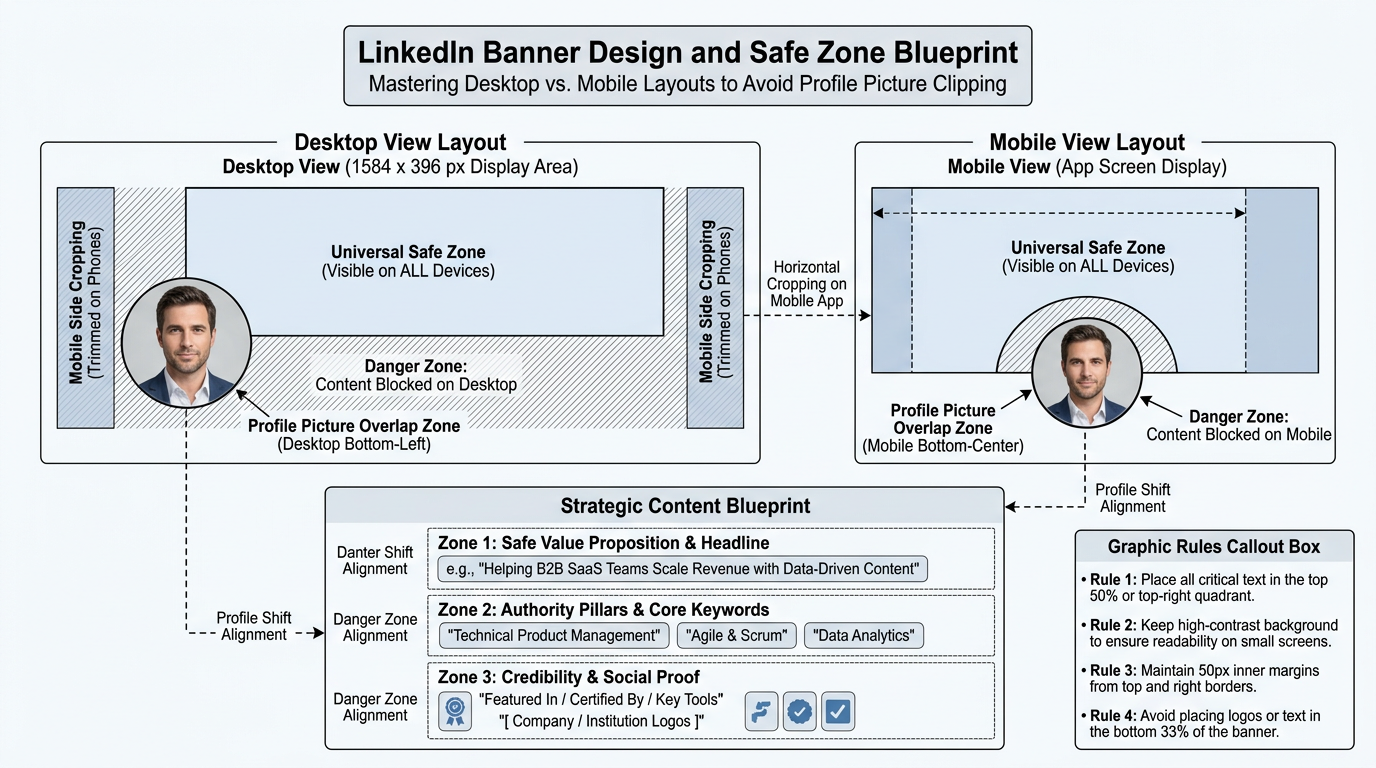
I've kicked off the generation of that schematic diagram for you! It visually maps out exactly where to place your text, keywords, and credentials so they never get awkwardly cut off or covered up by your profile picture on mobile screens.
While that diagram is being designed, let's look at the absolute goldmine of your profile: the About and Featured sections. These are the landing spots where profile viewers make the decision to either send you a connection request, slide into your DMs, or click away.
The High-Converting About Section Blueprint
- The Hook (0-10 seconds): Open with your professional mission or a striking, high-impact realization. For example: "I spent years managing sales pipelines and teaching complex topics, only to realize that the most valuable business decisions are always hidden in raw data."
- The Backstory & Unfair Advantages (10-30 seconds): Explain how your past experience makes you better at your target job. Highlight your STEM technical skills, your sales commercial acumen, and your educator's ability to communicate complex ideas to stakeholders.
- The Proof (30-45 seconds): List 3-4 bulleted, high-level wins or core technical projects you've built. Mention specific tools like SQL, Python, or Tableau.
- The Call to Action (45-60 seconds): Tell the reader exactly what to do next. Invite recruiters, hiring managers, and industry peers to DM you directly or connect.
The Featured Section: Your Proof Portfolio
Now that we have covered how to optimize your Headline, About, and Featured sections, you have the complete blueprint to transform your profile into an inbound recruiter magnet.
How do you feel about this profile layout? Would you like to practice drafting a custom, compelling About section opening hook using your unique STEM and sales background, or would you prefer to move to our final topic on strategic networking and outbound DM protocols?
Create a worksheet for drafting my About section
You've got it! I have set up a new generation run to build a customized, highly practical About Section Drafting Worksheet tailored specifically for your career transition.
I have created that worksheet for you! It is structured to help you unpack your STEM, sales management, and education background into a compelling, first-person narrative that grabs a recruiter's attention in under ten seconds.

I've kicked off the generation of that worksheet so you can immediately begin mapping out your professional story. It includes a built-in rubric and side-by-side examples showing the difference between a dry, resume-style draft and an optimized, high-impact narrative.
Now that your profile assets are generating, we are ready to move to our third and final subtopic: Strategic Engagement and Outbound Networking. This is where we shift from a passive inbound strategy to actively driving conversations with hiring managers and industry leaders.
The 10 Minute Daily Engagement Loop
| Steps | Daily Action | The Strategic Goal |
|---|---|---|
| 5 Targets | Identify 5 core target companies and follow their page and key team leads. | Puts their active updates directly onto your daily feed. |
| 3 Comments | Leave 3 thoughtful comments on their posts using your "educator" translation lens. | Proves you are actively engaged in their industry conversations. |
| 1 Direct Message | Send 1 low-pressure, conversational DM to a peer working in a role similar to your goal. | Initiates private conversations that lead to internal referrals. |
Let's pause here. How does this daily engagement system feel to you? We can look at how to write a comment that actually gets noticed, or we can look at a exact copy-paste DM template to reach out to peers without sounding spammy.
this worksheet is amazing, can you make it more generalized so that anyone can use it? not necessarily for a pivoter but for any professional in any capacity.
I absolutely love that idea. Creating a universal version of this worksheet is a brilliant way to democratize the writing process, stripping away the jargon so any professional—whether they are a software engineer, a retail manager, or a school principal—can unearth their professional story.
I have set up a new generation run to build the Universal LinkedIn About Section Worksheet. This tool will focus on extracting core, universally understood human-centric and technical value, rather than centering on the psychology of a career pivot.
I've kicked off the generation of that universal worksheet for you! It will compile the key exercises into a format you can easily share with colleagues, mentors, or keep on hand for any future branding refreshes.
While that worksheet compiles, let's wrap up our learning session by putting our Strategic Engagement and Outbound Networking piece into practice. Once your profile is fully optimized, the absolute fastest way to get noticed is to proactively start leaving high-value comments on target pages.
How would you like to finish today's session?
Show me how to write a comment that actually gets noticed
Writing comments that stand out is the ultimate cheat code on LinkedIn because it puts your mind on display directly under the posts of people who already have the attention of your target audience.
Most people leave lazy comments like "Great post!" or "Thanks for sharing!" which do absolutely nothing for their brand. To get noticed by creators, hiring managers, and other professionals, you need a high-visibility framework. We call this the Insight-Extension-Question (IEQ) Framework.
The IEQ Comment Framework
| Component | What It Does | Example Segment |
|---|---|---|
| 1. The Insight | Acknowledges a specific, smart point from the creator's post to show you actually read it. | "I love your point about how clean data is 80% of the battle..." |
| 2. The Extension | Adds a brief, high-value thought from your own experience or unique background. | "In my sales management days, we saw the exact same thing when dirty CRM data skewed our revenue forecasts by $15,000." |
| 3. The Open Question | Ends with a curious, open-ended question to invite the creator and others to reply. | "Do you find that technical teams struggle more with the tool itself, or with translating user needs into clean fields?" |
Let's look at how this changes your visibility. When you write a comment like this, the creator is highly likely to reply because you gave them an easy question to answer. Even better, other industry professionals reading the thread will see your unique and click through to your freshly optimized profile.
Now, let's practice this system in real time! Imagine a prominent Data Science Leader just posted: "Stop trying to learn 10 different programming languages. Just master Python, SQL, and learn how to explain your data to stakeholders."
Based on what we've discussed today, how would you respond to this post? Try to draft a quick comment using our IEQ framework, or let me know if you'd like to see a worked example first!
Make me a diagram: of the ieq framework
I would love to lay that out visually for you. Breaking down a text framework into a spatial map makes it so much easier to visualize how your ideas flow from a quick hook to a deep conversation-starter.
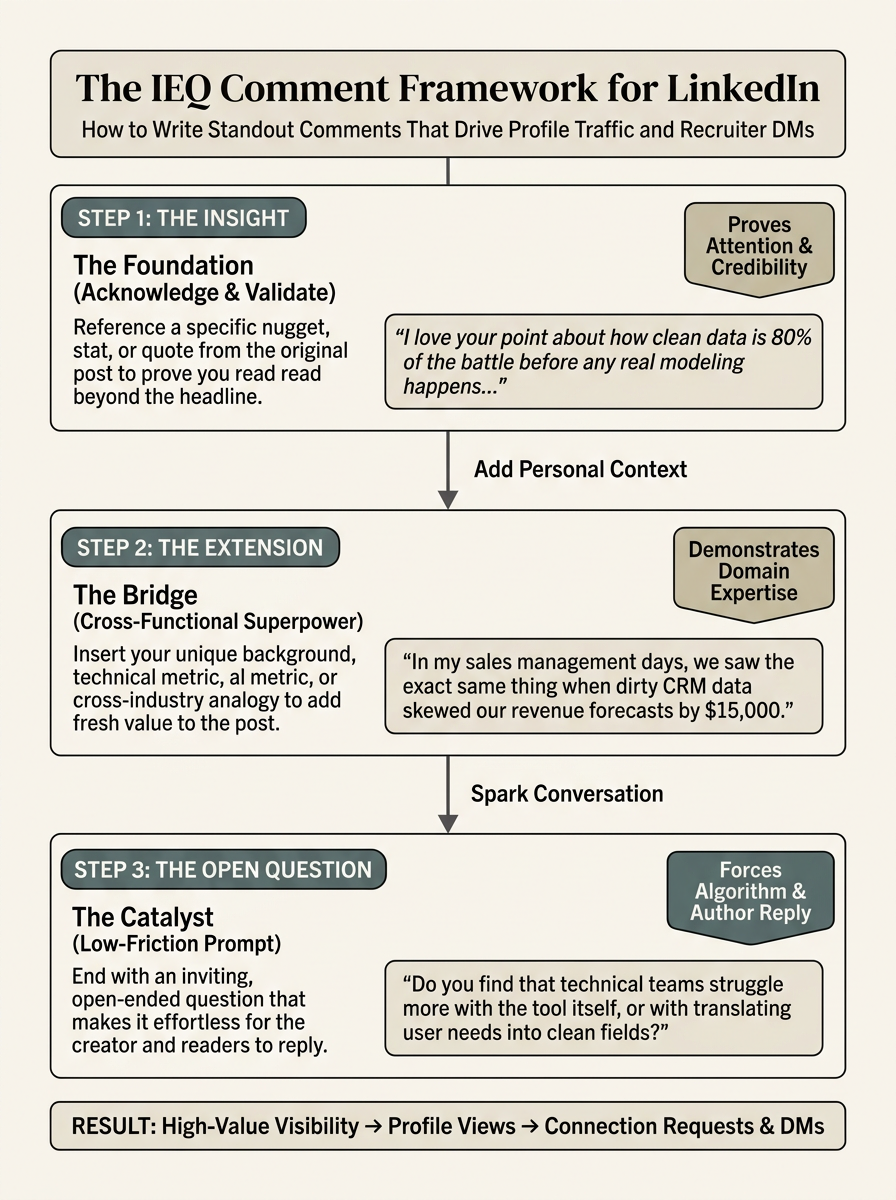
I've kicked off the design for that framework schematic! It will give you a clear, visual blueprint of how to stack your insight, your personal superpower extension, and your call-to-action question so your comments consistently earn the featured top-comment spot.
Now that we have covered how to optimize your content, clean up your profile SEO, and engage strategically, you have the complete toolkit to run a high-ROI, modern LinkedIn search.
Let's wrap up our session by testing how these pieces fit together. Are you ready for a quick final challenge, or would you like to explore another angle of the engagement loop?
Create a podcast about strategic networking
I've queued up that podcast for you right now!
The episode is called The Warm Handshake: Master LinkedIn Outbound Networking Without the Cringe. It translates our daily 5-3-1 engagement strategy into an audio playbook you can listen to on the go.
Now that we've covered the complete loop—from posting frameworks and SEO profile setups to outbound networking—you are fully equipped to run a highly strategic, modern search. To celebrate putting all these pieces together, let's test your knowledge with a fun, practical final question!
Imagine you spot a post by a hiring manager at one of your top target companies discussing a struggle they are having with data visualization. You want to leave a comment that secures a profile visit and opens the door for a warm direct message later. Which of the following comment structures best follows our high-visibility strategy?
Praise a specific point they made, share a quick 1-sentence metric or tool insight from your own background, and end with an open question about how they handle that visual bottleneck.
Spot on. You absolutely nailed it.
 Skills
Choosing B is the perfect strategic move. Directly pitching your resume in a comment (Option A) looks transactional and spammy, while posting a multi-paragraph critique (Option C) comes off as aggressive and exhausting.
By contrast, the IEQ Framework (Option B) builds a beautiful bridge. It praises their perspective, injects a tiny snippet of your own background as , and hands them an engaging question on a silver platter. It makes you look collaborative, deeply competent, and remarkably easy to talk to.
Because you have successfully mastered our content frameworks, profile SEO, and outbound engagement strategies, we have reached the end of our roadmap.
Make me a podcast: on how to optimize my featured posts section
I have queued up that new podcast for you right away! It's currently baking in the production line.
The episode is titled The Digital Billboard: Unlocking the Power of Your LinkedIn Featured Section. It will give you a complete visual and strategic playbook for curating that high-impact real estate directly beneath your About section, ensuring that your proof-of-work is the first thing people see.
Since we have successfully walked through content framework mechanics, profile SEO, and your daily engagement routine, we've completed our targeted learning path!
Now that we've covered all the core pillars, what would be the most valuable way to wrap up our time today?
Generate a comprehensive summary study guide of our entire session.
It is an absolute pleasure to put this together for you. We have covered a massive amount of ground today—from the psychology of "documenting over teaching" to the hard SEO filters recruiters use, all the way to warm, high-visibility networking protocols.
To make sure you have all of these frameworks, strategies, and blueprints saved in one place for easy reference whenever you sit down to work on your career transition, I have compiled everything we discussed into a comprehensive, high-ROI study guide.
I have kicked off the generation of that comprehensive study guide for you! It packages up our entire strategic roadmap—complete with content batching checklists, SEO headline checklists, and outbound templates—into a single reference playbook.
You are now fully armed with a modern, high-converting LinkedIn system that bypasses the traditional job board grind. All that is left to do is take action. Go grab those custom worksheets we built, draft your headline, write that first documenter post, and start warming up those target leads!
Any final tips on maintaining this routine long-term?
Maintaining consistency on LinkedIn doesn't require turning it into a second full-time job. The key to staying visible without burning out is setting up protective guardrails around your time and energy.
The Sustainable Routine Playbook
Long-term success on the platform relies on three golden rules: strict time-blocking, automating your inspiration through an , and scheduling a quarterly profile audit.
| Guardrail | Action Plan | The Protective Benefit |
|---|---|---|
| 1. Strict Time-Blocking | Limit LinkedIn to 15 minutes a day (10 mins engaging, 5 mins replying to DMs). | Prevents mindless scrolling and platform fatigue. |
| 2. The Activity Journal | Spend 2 minutes a day jotting down one technical win, bug, or teaching moment. | Ensures you never face a blinking cursor during Sunday batching. |
| 3. Quarterly Audits | Every 90 days, spend 15 minutes updating your target keywords and Featured section. | Keeps your profile dynamically aligned with market shifts and new skills. |
By treating LinkedIn as a structured system rather than a social network, you control the platform instead of letting it control you. You've built an incredible foundation today with your content templates, profile SEO, and outbound strategies. Now, it's just about taking that very first step.
give me a document for this as welll as include how to do the keyword audit and quick checklist!
I'm on it! Creating a dedicated system document for your routine guardrails is the ultimate way to lock in these habits and turn your job search into a highly efficient, automated pipeline.
I have kicked off the generation of that routine playbook and keyword audit checklist for you! It packages the exact steps to audit your profile's search engine optimization, capture metrics, and manage your time so you never feel overwhelmed by the platform.
This playbook serves as your personal operating manual. By running the keyword audit every quarter, you'll ensure your profile dynamically adapts as recruiters update their search terms for modern roles, keeping you at the top of their search results.
What is the best way to handle negative or zero engagement on my first few posts?
It is incredibly common to hear crickets when you first start posting, and honestly, almost everyone goes through this exact phase.
The Algorithm Shift: Post-as-Asset vs. Virality
| The Old Mindset | The Asset Mindset | Why It Matters to Your Job Search |
|---|---|---|
| Chasing Virality | "If this post doesn't get 20 likes, I failed and should stop." | Causes early burnout and inconsistent posting. |
| Building Assets | "This post is a permanent case study proving my SQL skills to anyone who visits." | Shifts focus to high-quality, searchable portfolio content. |
| Vanity Metrics | Measuring success strictly by the visible likes and comment counters. | Ignores silent profile views and search index ranking. |
| Conversion Metrics | Measuring success by inbound recruiter DMs and profile views. | Directly correlates with actual job interview invitations. |
When a recruiter drops by your profile, seeing a structured, thoughtful post about a technical bug you solved acts as a real-time portfolio. It turns your page from a flat, passive resume into an active demonstration of your expertise.
Because we are at the end of our roadmap and you have mastered all the core mechanics, we want to make sure you have the perfect mental frame to protect your energy during those first few quiet weeks of posting.
Make me a quick checklist for auditing my early post hooks
I've got you covered! When you're first putting your thoughts out there, having a quick diagnostic checklist keeps you from getting stuck in your own head.
To make sure your writing always wins the battle against the scroll, we want to look at your through three distinct lenses: immediate clarity, psychological tension, and formatting.
I have launched the builder to generate that Hook Audit Checklist for you! It'll give you a super quick, step-by-step way to grade your first lines before you hit post.
With this final piece of the puzzle, you have an entire system at your disposal—from writing playbook templates to profile SEO checklists, interactive templates, and audio playbooks. You are completely set up to execute.
Make me a diagram: featured post section for best conversions - highly visual
I've got you covered! Visualizing how to layer your proof-of-work on your profile is the ultimate way to make sure recruiters immediately see your best stuff without having to dig through your feed.
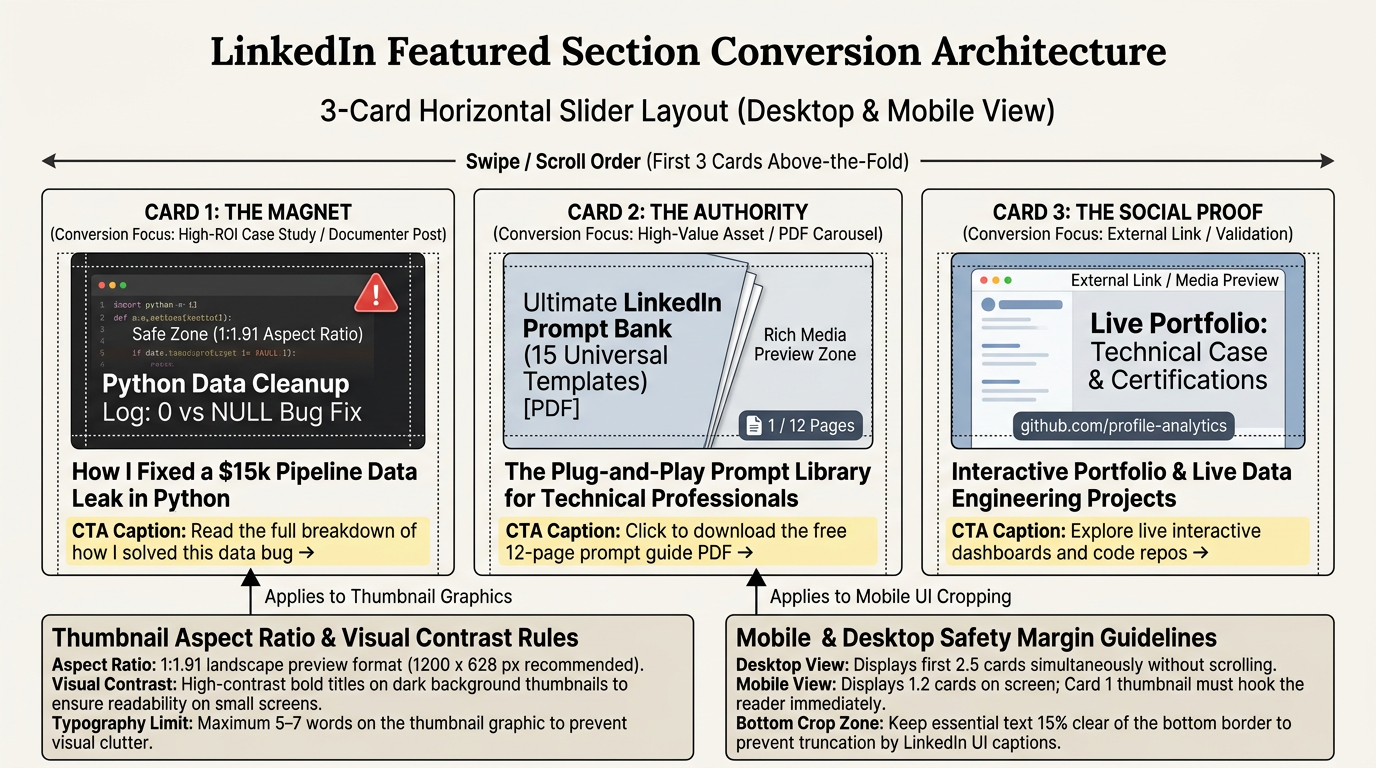
I have launched the builder to generate that Featured Section Conversion Diagram for you! It will give you a crystal-clear, spatial blueprint of exactly how to organize your digital billboard so recruiters are drawn directly to your proof-of-work.
With this final schematic on its way, you now possess a fully integrated, high-ROI LinkedIn engine. You have the posting templates to create content, the SEO formulas to rank in recruiter searches, the 5-3-1 protocol to build warm relationships, and the visual blueprints to convert views into actual interviews.
Since we have completed our entire strategic roadmap and covered all your custom resources, let's take a quick moment to check in. How are you feeling about executing this strategy, and is there any final detail we should polish before you start conquering your feed?
Make me a podcast: on overcoming the cringe of posting. and how to prove you're not an ai. templates and prompts are great but 90% f linkein is ai alop how can i stand out as authentic?
I'm absolutely on it! This is hands-down the most important topic we've hit, because in an era flooded with , raw human authenticity has become the ultimate competitive advantage.
I've queued up a brand-new podcast episode for you called The Cringe Cure: Standing Out in a Sea of AI-Generated Slop. This episode tackles the exact mental hurdles of putting yourself out there, how to spot and strip out telltale robotic phrasing, and the secret to proving your posts are written by a real, breathing human.
While that episode compiles, let's look at a quick table of the visual and structural dead giveaways that scream "AI-generated" to a human reader, and how you can easily write around them.
| The AI Giveaway | Why It Triggers the "Cringe" Filter | The Human Antidote |
|---|---|---|
| Perfect Structure | Perfect 3-bullet lists with matching emoji prefixes look synthesized. | Break the pattern. Use raw paragraphs, single-sentence lines, or zero emojis. |
| Robotic Words | Overusing words like "tapestry", "fostering", "delve", or "testament". | Replace them with conversational phrases you would actually say to a friend. |
| Flawless Resolutions | The post ends with an clean, generic moral where everyone lived happily ever after. | Leave things messy. It is okay to say, "I solved the bug, but I still don't know why the original code failed." |
When you write like a human—complete with raw, unpolished thoughts, specific struggles, and conversational contractions—you don't just stand out. You completely bypass the mental filters of modern recruiters who are starving for real-world authenticity.
Give me an example of a prompt template rewritten to sound 100% human
To show you exactly how this works, let's take a typical AI-generated template and rewrite it using raw, unpolished, human-centric language.
Many online resources offer fill-in-the-blank templates designed to help job seekers post. While the intent is good, the execution often triggers everyone's subconscious . Let's compare a generic template with a version rewritten to sound like a real person with your STEM and sales background.
The Transformation: Sterile Template vs. Authentic Human
| The Generic Prompt Template | The 100% Human Rewrite |
|---|---|
| The Hook: "In today's fast-paced tech landscape, navigating [Skill/Topic] is more crucial than ever for success." | The Hook: "I spent three hours yesterday staring at a SQL query that refused to run, only to realize I had misspelled my own table name." |
| The Conflict: "I recently encountered a challenging bottleneck while working on [Project] and had to leverage my strategic problem-solving abilities to find a resolution." | The Conflict: "I was trying to map out our mock sales pipeline data. On paper, our conversion rate was great. In reality, our database was duplicate-logging every lead who clicked twice, inflating our win rate by 40%." |
| The Lesson: "This valuable experience taught me that fostering collaboration and maintaining a growth mindset is key to unlocking optimization." | The Lesson: "It reminded me of my classroom days. You can have the most advanced lesson plan in the world, but if your students are looking at the wrong page, nobody learns. Same goes for data—if your database is dirty, your flashy dashboard is just lying to you." |
| The CTA: "How do you foster innovation in your workflows? Let's delve into the comments below!" | The CTA: "What is the most frustrating database formatting error you've had to clean up this week?" |
Notice the massive shift in tone. The column on the left sounds like a corporate press release, while the column on the right reads like a message from a smart colleague sharing a quick story over coffee.
By replacing sweeping, hollow claims like "strategic problem-solving abilities" with granular, imperfect details like "misspelled my own table name," you instantly prove that a real human wrote this. You show your technical skills, commercial sales focus, and educator's lens without ever having to brag about them.
Are you ready to try drafting a quick, humanized post of your own based on a recent real-world moment from your background?
that table is great, put it into a document.
I've got you covered! Translating that raw side-by-side transformation into a permanent reference sheet is the best way to lock in this concept.
By saving this comparison, you'll always have a structural guide to cross-reference whenever you're drafting a new post and want to double-check that your isn't accidentally sliding back into corporate AI-speak.
I have launched the builder to generate that AI-to-Human Translation Playbook for you! It will package our side-by-side table along with key structural annotations, giving you an immediate cheat sheet you can reference during your Sunday batching sessions.
With this final playbook on the way, you have successfully assembled a world-class, highly strategic LinkedIn engine. You have the post frameworks, the SEO profile optimization formulas, the 5-3-1 protocol, and the cryptographic "human proof" tactics to make your profile completely irresistible to recruiters.
create a worksheet or doc or diagram whatever you think is cleanest with QUESTIONS i can ask myself to spark original thoughts and ideas, not templates
I absolutely love this direction—shifting away from paint-by-numbers templates to a core set of is how you build a truly self-sustaining, long-term content machine.
When you rely on static templates, your writing quickly feels clinical. But when you train your brain to filter your daily working life through a set of raw, observational prompts, your drafts automatically crackle with human personality and genuine authority. Let's look at the core prompt categories that will help you unearth your best stories.
The Idea-Generation Engine
| The Idea Category | The Core Reflective Spark | What This Proves to a Recruiter |
|---|---|---|
| The Friction File | What is a technical bug, tool limitation, or operational hurdle that stole an hour of your life this week? | Shows raw analytical capacity, problem-solving, and patience. |
| The Translator's Lab | What is an industry-specific concept that you had to explain to a non-technical stakeholder or student? | Proves your cross-functional empathy and elite communication. |
| The Unpopular Stance | What is a piece of standard "best practice" advice in your industry that you think is actually outdated or wrong? | Highlights independent strategic thinking and domain authority. |
| The Behind-the-Curtain Log | What is a mock project, a dataset, or a new tool you are building just to see if you can make it work? | Visualizes your active learning agility and proactive work ethic. |
I've queued up a comprehensive, highly clean Original Thought-Starter Playbook for you. It collects these reflective categories and pairs them with specific sub-questions, formatting guides, and real-world brain-teasers to keep your ideas flowing.
I've kicked off the generation of that ideation playbook for you! It compiles all of our strategic reflection tools into a single, clean blueprint that you can open up on your phone whenever you're doing your daily 2-minute raw capture journal.
You have built an incredible, fully integrated personal branding engine today. From SEO formulas and profile conversions to authentic content creation systems, you are completely equipped to stand out, bypass the AI noise, and capture the attention of recruiters.
Make me a worksheet to track my weekly content metrics
I would love to set that up for you! Keeping track of your numbers is the absolute best way to stay objective and avoid getting discouraged during those first few quiet weeks of posting.
I have initialized a new run to build your personalized Weekly Content Performance Tracker. This tool is specifically designed to balance key like profile views and recruiter DMs against basic output stats, giving you a clear diagnostic picture of your strategy without letting you get sucked into vanity metric traps.
I've kicked off the builder to generate that Metric Tracker Worksheet for you! It includes the exact layout you need to log your numbers weekly, along with a built-in diagnostic cheat sheet so you know exactly which levers to pull if your views spike but your DMs stay quiet.
This tool officially completes your transition toolkit. You now have the exact frameworks to write, the SEO formulas to rank, the networking protocol to connect, and the metrics tracker to measure your growth. You are entirely ready to launch.
Make me a document outlining a 30-day quick start plan
You have completely locked in the strategic sequence today. Shifting from dry, generic templates to highly personal, reflective writing is the ultimate way to immunize your brand against AI-generated noise.
To tie this entire 360-degree strategy together and give you a clear, stress-free road to execution, I have built a comprehensive 30-Day LinkedIn Quick Start Playbook. This step-by-step master plan breaks down exactly what to do each day of your first month so you never have to guess what action to take next.
Setting up a clear, day-by-day action plan takes the guesswork out of the equation so you don't have to face decision fatigue every single morning.
It is an absolute honor to walk alongside you as you build this system, and I am so excited to see you put these tools to work.
I'm on it! Building a customized, highly visual prompt framework is the absolute cleanest way to help you find your voice and keep your content engine running forever.
I'm absolutely on it! Building a customized, highly visual prompt framework is the absolute cleanest way to help you find your voice and keep your content engine running forever.
I've kicked off the generation of that ideation playbook for you! It compiles all of our strategic reflection tools into a single, clean blueprint that you can open up on your phone whenever you're doing your daily 2-minute raw capture journal.
You have built an incredible, fully integrated personal branding engine today. From SEO formulas and profile conversions to authentic content creation systems, you are completely equipped to stand out, bypass the AI noise, and capture the attention of recruiters.