
pyspark
Welcome to the world of PySpark! Before we dive into building fast, distributed data applications, I'd love to know a bit more about what you want to achieve so we can tailor our path.
What is your main goal with PySpark (e.g. data engineering, machine learning, migration from Pandas), and what experience do you already have with Python and SQL?
Data Engineering; I know Python and SQL well.
It's great to have you here! Since you already have a strong foundation in Python and SQL, you're going to find PySpark's concepts and syntax incredibly intuitive.
Before we write our first line of code, we need to understand how PySpark works under the hood. Unlike standard Python, which runs your code on a single machine, PySpark is designed for distributed computing—meaning it coordinates multiple computers to solve a single problem.

Continue to Driver, Executors, and Cluster Manager roles
The Core Trio: Driver, Executors, and Cluster Manager
Think of PySpark's architecture like a highly efficient restaurant kitchen. You have a head chef orchestrating everything, a group of line cooks doing the actual chopping and cooking, and a kitchen manager ensuring there are enough workstations and ingredients for everyone.
- The : This is the head chef. It is the central master node where your main Python script runs. The driver's job is to analyze your PySpark code, break it down into smaller logical steps, and orchestrate the execution.
- The : These are the line cooks. They are worker processes running on separate machines (nodes) across the cluster. Their sole job is to execute the individual tasks assigned by the driver and store the processed data in their memory or disk.
- The Cluster Manager: This is the kitchen manager. It is an external service that allocates physical resources (like CPU and RAM) across the cluster. The driver asks the cluster manager for help, and the manager hands over the executors to get the job done. Spark can plug into different managers, such as , Kubernetes, or its own Standalone manager.
Give me a diagram of the PySpark architecture
I've started generating a diagram to help you visualize how the Driver Node, the Cluster Manager, and the Executors interact with each other in a real-world cluster.
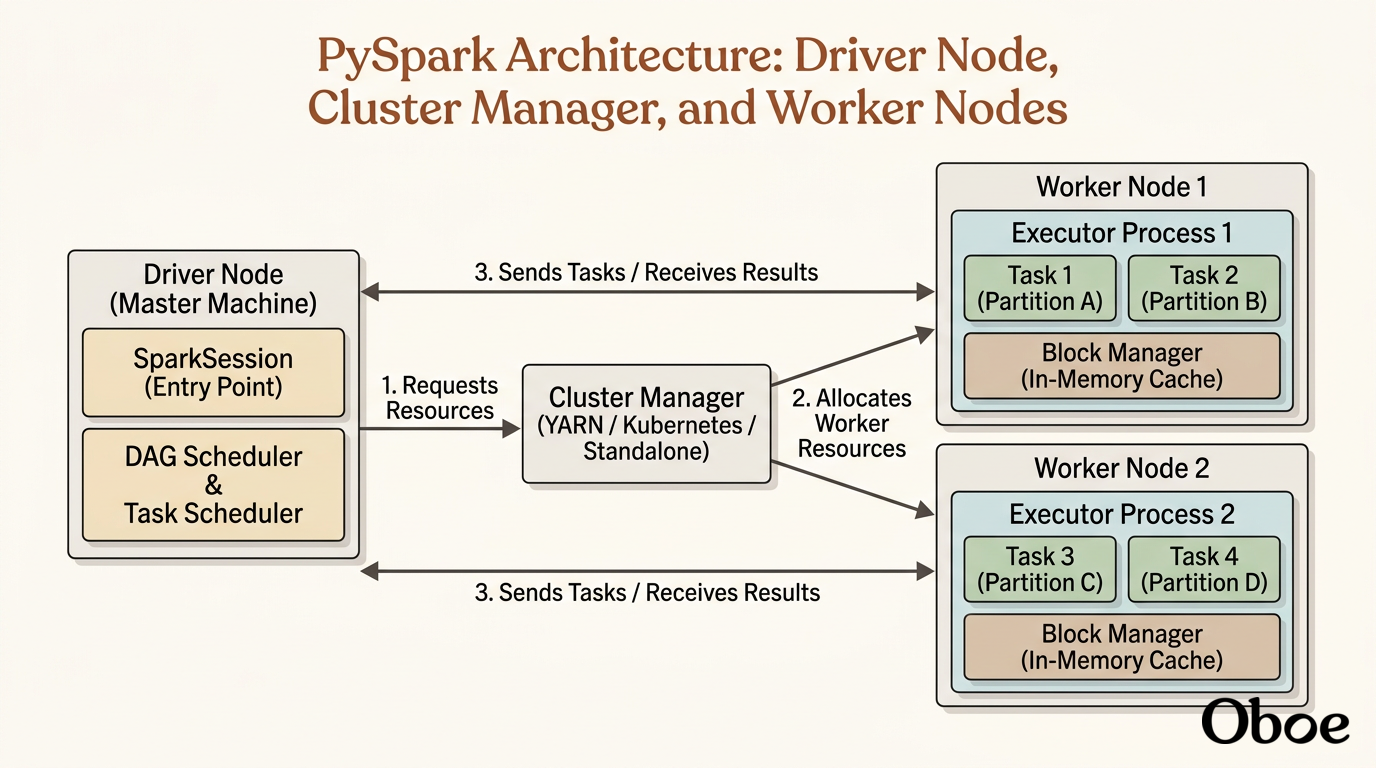
show animation and theach me the archhitecture
Let's bring this entire system to life! Watching how these nodes coordinate in real time is the best way to understand how PySpark processes your code.
PySpark execution flow diagram showing Driver Node, Cluster Manager, Executor nodes with task units, and automated fault rerouting.
While that interactive visualization compiles, let's trace this flow step by step. When you hit run, the driver acts as the absolute brain. It compiles your high-level Python code, builds that optimized , and coordinates with the cluster manager to spin up executors across your network.
Once those executors are running on the worker nodes, the driver directly assigns them individual tasks to execute in parallel. This is where the magic happens: if you have a 10-gigabyte dataset, Executor 1 might process the first 5 gigabytes while Executor 2 processes the remaining 5 gigabytes simultaneously.
But what happens if a physical computer in your cluster loses power mid-calculation? This is a massive concern in big data engineering, but PySpark handles it gracefully.
Because the driver node keeps track of the DAG, it knows exactly how every chunk of data was supposed to be built. If Executor 1 suddenly goes offline, the driver doesn't panic or crash your job. It simply looks at its master blueprint, contacts the cluster manager to get a new worker node, and re-runs just the specific tasks that were lost. This automatic is why Spark replaced older, fragile big data frameworks.