
c programming
Welcome! I'm really excited to dive into the world of C programming with you. Before we sketch out our learning path, I'd love to know a bit about your background so we can pace things perfectly for you.
Are you completely new to programming, or do you already have experience with other programming languages?
I have a tiny bit of exposure but consider myself a beginner
I'm glad to hear you have a bit of exposure already. Since you're starting fresh with C, we've designed a structured path that will take you from a complete beginner to confidently managing memory and writing modular code. Let's look at the journey we have ahead of us.

How a C Program is Born
#include <stdio.h>

int main() {
    printf("Hello, World!\n");
    return 0;
}
-
The : The line
#include <stdio.h>is like a shipping order. It tells the compiler to grab a standard library file calledstdio.h(Standard Input/Output) so we can use functions likeprintfto display text on the screen. -
The
mainFunction: Every single C program must have an where execution begins. In C, that is themainfunction. Theintbeforemainmeans this function will return an integer value back to the operating system when it finishes. -
Statements and Return: Inside the curly braces
{}is the body of our program.printfis a built-in function that prints text to your screen. Finally,return 0;tells the operating system, "Everything ran perfectly without any errors!"
Notice how every individual statement inside our main function ends with a semicolon ;? In C, semicolons are like periods at the end of sentences; they tell the compiler that one instruction has officially ended and a new one is about to begin. If you forget just one, the whole program will refuse to run. Let's see if we can spot how these parts play together.
Show me a diagram of the compilation process
I'd love to show you how a C program goes from raw text to an executable file. I've initiated a diagram of the C compilation process so you can see exactly how your code is transformed step-by-step.
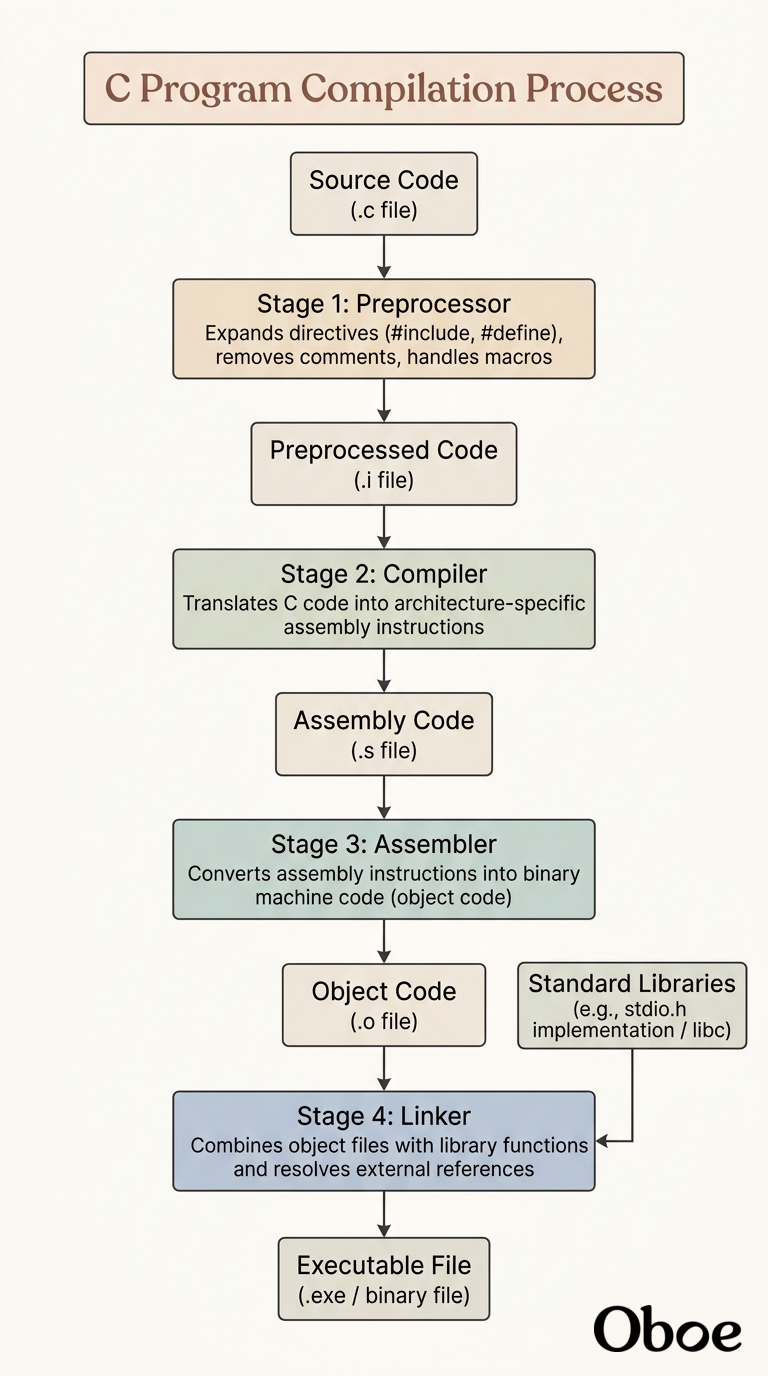
-
: The preprocessor handles lines starting with
#. It strips out comments and physically copies the contents of header files (likestdio.h) into your program, resulting in an expanded source code file. - : The actual compiler takes that preprocessed text and translates it into assembly language, which is a low-level set of instructions written specifically for your computer's processor architecture.
- : The assembler translates those assembly instructions into binary object code—the pure ones and zeros that the CPU physically understands.
-
: Finally, the linker takes your object code and merges it with the standard C library code (like the actual binary instructions for
printf). It packages everything together into a single, standalone executable program that you can run on your machine.
Let's continue to variables and data types
Let's dive right into variables and data types, which are the fundamental building blocks for storing and manipulating information in your C programs.
Understanding Variables and Memory
In C, you can think of a as a named storage box inside your computer's temporary memory (RAM). When you create a variable, you are telling the computer, "Hey, reserve a tiny pocket of space for me, and let me reference it using this specific name."
But unlike some modern languages like Python or JavaScript where you can throw any kind of data into any variable at any time, C is a . This means you must explicitly state what type of data your variable will hold before you can even use it. This strict rule exists because the computer needs to know exactly how many bytes of physical memory to carve out for that box.
The Four Fundamental Data Types
To cover almost any basic program, you will rely on four primary data types built directly into C:
int: Short for integer. Used to store whole numbers (both positive and negative) without decimals, like42or-15.float: Short for floating-point. Used for storing single-precision fractional numbers with decimals, like3.14or9.99.double: A double-precision floating-point. It is just like afloatbut uses twice as much memory space, allowing it to store much larger, highly precise decimal numbers with up to 15 decimal digits.char: Short for character. Used to store a single individual character, like'A','z', or even a single punctuation mark like'!'. Note that in C, individual characters are always enclosed in single quotation marks.
Let's look at how we write these in code. Declaring a variable follows a simple two-step blueprint: first you specify the data type, then you give it a unique name. You can also assign a starting value right away using the = assignment operator, which is called initialization.
int age = 21;
float gasPrice = 3.59;
double pi = 3.1415926535;
char grade = 'A';
Now that you've seen how to declare these four basic types, we can look at how to show these values on the screen or even let a user type their own values in. Would you like to see how we print these variables to the screen using formatting, or would you prefer a quick quiz to test your memory on these data types first?